Intelligent document processing solutions built into your workflow

We build automated document processing that reads the invoices, forms, CVs and drawings your team retypes today, and sends checked data to the systems you run.

4.9 on Clutch from 45 reviews · 500+ projects since 2013 · AI in production since 2023

Our intelligent document processing solutions

Our intelligent document processing solutions turn the invoices, claims, CVs and drawings people retype into structured data inside the app you sell or the workflow you run. We start with the document type that costs the most hours, then add the next.

  • AI data extraction

    AI data extraction pulls named fields, tables and line items from PDFs, scans and photos into a schema we agree with you up front. Your systems receive typed, validated data instead of a block of text that someone still has to sort.

  • Invoice processing automation

    Invoice processing automation reads supplier invoices in different layouts, checks totals and tax against your rules, and passes each one to the right approver. Your finance team deals with the exceptions, not with every invoice that arrives.

  • Document sorting and splitting

    Document classification sorts mixed uploads first: a multi-page PDF is split into documents, and each page is labeled as a form, cover sheet or drawing. People can send one file with everything in it, and nothing lands in the wrong queue.

  • Forms, marks and drawings

    Computer vision reads what text tools miss: ticks and line marks on paper forms, stamps, and symbols on technical drawings. Paper-heavy jobs, from marking test sheets to counting items on a plan, stop depending on tired eyes at the end of a long day.

  • Review queues for uncertain fields

    Review screens show staff only the fields the system is unsure about, each with the cropped image and the reason it was flagged. One click confirms or corrects a field, so people spend their time on judgment instead of retyping.

  • Search and answers across your documents

    Search and Q&A over contracts, policies and manuals answers from your own files and links each answer to the page it came from. Staff find the clause or procedure they need without opening folders one by one. See RAG development.

Data that should start an approval goes through business process automation; data bound for your ERP or CRM, through enterprise AI integration.

What changes when documents read themselves?

Staff stop retyping, errors are caught before they reach your records, and every value traces back to the page it came from. In Ardent Partners’ January 2026 benchmarks, an invoice cost $9.84 on average to process and took 8.2 days.

Fewer hours of data entry

Clear documents pass straight through, and only uncertain fields reach a person. We measure hours per document type in discovery, so the saving is a before-and-after number.

Errors caught before they spread

Every extracted value is checked against the schema and your business rules, such as line items that must add up to the total. A mismatch goes to review instead of into your accounting or HR system.

How we read a document, from upload to checked data

No single method reads every document well. We choose one per document type, then let code, not the model, check the result. A March 2026 study on large real-world datasets found that strong multimodal models did about as well from the page image as with OCR text.

1. Sort the pages

Each page is labeled by type, and a crop removes title blocks, legends and stamps that would confuse the next step. On a drawing-takeoff build, cropping to the plan area removed false hits and cut one run from 146 to 60 seconds.

2. Read the content

Digital PDFs give up their text directly. Scans go through OCR or computer vision, and a model such as Claude or GPT reads the hard parts, like handwriting or crowded tables. See LLM integration.

3. Fill an agreed schema

The model returns data in a fixed structure, field by field, and anything that doesn’t match the schema is rejected. Schemas, prompts and examples sit in your repository, versioned like code.

4. Check with rules, not guesses

Quantities, totals and tax are calculated in code from the extracted values. If a model’s number differs from the calculated one, the calculated one wins.

5. Send to review or straight through

Each field carries a confidence score, checked against thresholds we agree with you. Anything below goes to review, and anything that moves money waits for a person’s approval. New layouts join the test set, which every prompt or model change re-runs before release.

Intelligent document processing software or a custom build: which fits?

Buy intelligent document processing software when your documents are standard, such as receipts or common invoices, and the data only needs to reach one system. Build when your documents, rules or review steps are specific to you, or when extraction sits inside a product you sell. In an IDC survey reported in September 2026, 63% of organizations said they were likely to change IDP supplier within 12 months.

Intelligent document processing software or a custom build: which fits?
IDP softwareCustom build with Techuz
Best forStandard documents in high volumeDocuments, rules or screens specific to your business
Accuracy on your documentsVendor benchmarks, on the vendor’s samplesA target per field, measured on your samples before go-live
Where it runsThe vendor’s platform, beside your systemsInside your app or workflow, in your cloud account
How you payLicense or per-page fees that grow with volumeBuild cost, then model and OCR running costs you see monthly
Who owns itThe vendorYou: code, prompts, test set and accounts

Still deciding?

Start with AI consulting, or test one document type in a software proof of concept.

Document projects we’ve built and tested

Our AI document processing work covers drawings, paper answer sheets and CVs. Two are proofs of concept; the third runs our own hiring.

Takeoff project mark

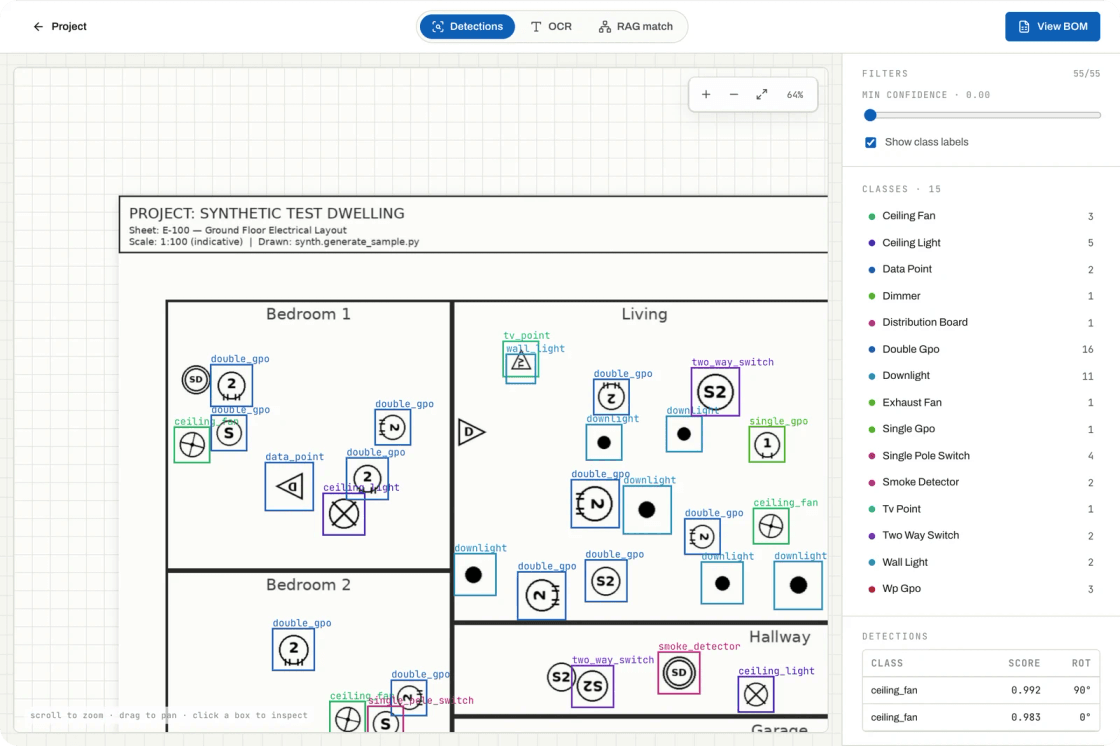
Electrical takeoff from building drawings

Construction estimating · Proof of concept

PDF drawing sets go in, and a priced bill of materials comes out, room by room. A trained detector, OCR and symbol search find each switch, light and power point. Code does every count and cost, and the AI only writes the estimator’s notes. In a forced-error test, the checker caught all 4 errors planted in the AI’s output.

Team
2 people
Timeline
3 months
Electrical takeoff from building drawings — Construction estimating · Proof of concept
Marking paper answer sheets with computer vision — Education · Proof of concept
OMR check project mark

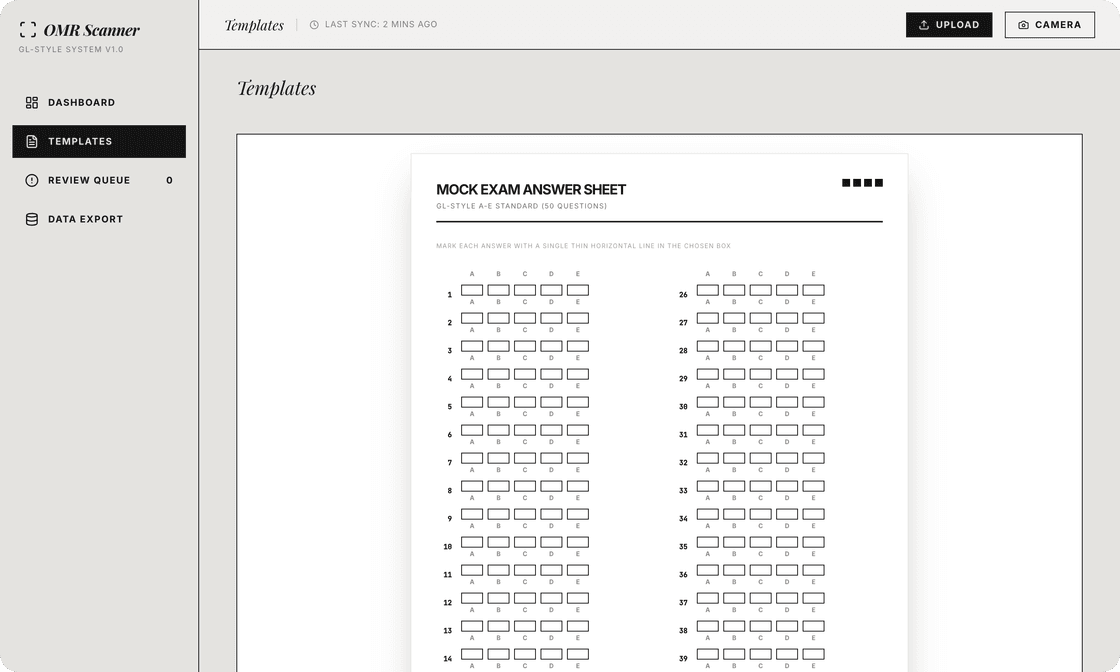
Marking paper answer sheets with computer vision

Education · Proof of concept

Staff scan students’ paper answer sheets and mark a whole class in the browser. Computer vision settles the clear line marks, Claude vision looks only at unclear boxes, and no AI call counts until a person confirms it. Of 2,250 answer boxes on nine test sheets, 73 went to the review queue, and operators changed 21 of them.

Team
2 people
Timeline
2 months
Budget
Under $30k
Understudy, our AI interviewer — AI interviewer for first-round hiring
Client logo

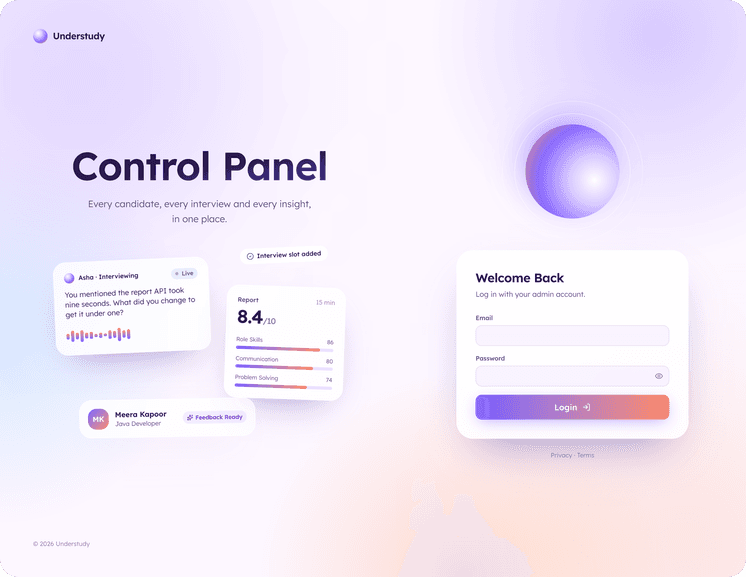
Understudy, our AI interviewer

AI interviewer for first-round hiring, Techuz product

Recruiters upload a candidate’s PDF CV, and Understudy turns it into a structured profile and a plan of 8–14 interview topics. After the spoken interview, every must-have skill in the job is marked Shown, Shown Weakly or Not Covered. Live on Techuz’s own first-round hiring, with 500+ real candidate interviews run.

Team
2 people
Timeline
About 3 weeks

How a document processing project runs

Document processing automation with Techuz takes four phases to go-live, about 8–14 weeks for a mid-size build. An optional 2–4 week proof of concept on your samples can come first. Across the 8+ projects we built with Claude Code in the last year, delivery took up to 50% less time than comparable builds the year before.

How long it takes
  • Proof of concept

    2–4 weeks

    One document type, your samples

  • One document type

    4–6 weeks

    Extraction, rules, a review screen, one connection

  • Several document types

    8–14 weeks

    Including a two-week parallel run

Five phases

How much does intelligent document processing cost?

Intelligent document processing with Techuz costs $4k–10k for a proof of concept and $10k–25k for one document type in your product. Several types with review screens cost $25k–50k, and platform-level work $50k+, built in phases.

Typical cost by project size (steps not to scale).
  1. Proof of concept

    2–4 weeks

    One document type, your samples, a measured result and a go/no-go

    $4k–10k

  2. One document type

    4–6 weeks

    Extraction, rules, a review screen and one system connection

    $10k–25k

  3. Several document types

    8–14 weeks

    2–4 document types, review screens, 3–6 integrations and a 2-week parallel run

    $25k–50k

  4. Platform-level

    Built in phases · 4–9 months

    Many document types across departments, rolled out team by team

    $50k+

What moves the price

  • How varied your documents are
  • The accuracy target
  • The share of human review
  • The number of systems
  • Data-residency rules

What’s included

Every price includes QA, project management and the go-live support above. Model, OCR and API usage is billed by the providers and estimated per month before you approve.

How do we keep your document data safe?

With written rules and checks you can inspect, not badges. Documents carry personal, financial or health data, so every project starts with an AI data policy you approve. For prompt injection and other model risks, see AI security.

A data policy you sign

It names which model reads which documents, where it runs and what data may reach it. Model calls use API terms that exclude training; documents that must stay in your cloud are read by Azure OpenAI running in your own tenant. For health records, we build to HIPAA requirements.

Files scanned, stored and deleted on schedule

Uploads are virus-scanned and kept in access-controlled storage. Retention jobs delete files on the schedule you set, as our own hiring product does with recordings after 90 days.

Every value traceable

Each extracted value links back to its page and to the prompt version that produced it. Review-queue corrections are logged with who made them and why, and users only see documents their role allows.

Technology we use for document processing

Each layer is chosen per document type and explained in writing.

  1. Reading documents

    Text, OCR and vision per document type

    • pypdfium2
    • Tesseract OCR
    • OpenCV
    • YOLOv8ONNX Runtime
    • AffindaCVs
  2. AI

    Model chosen per job; prompts and test sets versioned

    • Claude
    • OpenAI GPT
    • Azure OpenAIin your tenant
  3. Structured output

    A bad field fails loudly

    • Pydantic
    • JSON Schema validation
  4. Search

    Similar symbols, clauses or passages

    • Pinecone
    • FAISS
    • sentence-transformers
  5. Back end and review screens

    Python for AI, Node.js for workflows, React for review

  6. Cloud and monitoring

    Alerts on failed jobs

Intelligent document processing FAQ

  • When you need a scanning service with people keying forms at high volume, a document-capture outsourcer is a better match. Techuz doesn’t build desktop RPA in tools like UiPath, and won’t let AI approve payments or clinical records without a person’s sign-off. For documents that arrive only a few times a month, automation costs more than it saves.

  • Intelligent document processing (IDP) is software that reads invoices, forms and contracts, pulls out the data you need and checks it. It combines OCR, computer vision and AI models with business rules and human review, so doubtful fields go to a person. Techuz builds it into the client’s own app or workflow.

  • OCR turns an image of text into plain text and stops there. Intelligent document processing also identifies the document type, finds the fields you need, checks them against rules and routes doubtful ones to review. Techuz uses OCR as one step inside that process, wherever it is the cheapest reliable reader.

  • Accuracy depends on your documents, so Techuz doesn’t quote one number for all of them. We agree a target for each field, test it on your real samples before go-live and report the measured result. Fields below the confidence threshold go to a review queue instead of being guessed.

  • Running costs come from model tokens, OCR per page, vendor APIs and cloud hosting, and you pay those providers directly. Techuz gives you a monthly estimate in the solution design. After launch, AI cost is tracked per organization, so spend stays visible as volume grows.

  • With Techuz, a proof of concept takes 2–4 weeks, and one document type in your product takes 4–6 weeks. A mid-size build with several document types takes 8–14 weeks, including a two-week parallel run, and platform-level work runs 4–9 months. Slow access to vendor systems is the most common delay.

Get a Ballpark Estimate for Your Project

Tell us what you're building. We reply within 24 hours and send a ballpark estimate within 48.

Tell us about your project

A few lines are enough. We reply within 24 hours.

By sending this form I confirm that I have read and accept the Privacy Policy