
Your React team can read the code
React Native apps use the same JavaScript and React patterns as a React web app. Your web developers can extend them, so no single agency holds every change.

We take over React Native apps other teams built, bring them to the current release and keep new features reaching iOS and Android users.
4.9 on Clutch from 45 reviews · 500+ projects since 2013
Our React Native app development services keep the React Native apps that founders and product teams already run current and shipping. We audit first, so you pay to fix what blocks you, not to rebuild what works.
App takeovers cover React Native apps another agency or a departed team built, starting with a code audit and a list of gaps. You learn what to keep, what to fix first and what each fix costs before you commit to more work. See our technical architecture review.
Version upgrades move your app onto a React Native release that still gets fixes, and update the libraries that block the move. Your app keeps passing store checks and running on new phones as Apple and Google raise their rules.
New features go into the codebase you already have: payments, live order tracking, extra languages or AI features that run through the backend. Your users get new reasons to open the app each release, and your roadmap keeps moving. See AI features.
Moving to Flutter suits apps that need a large rewrite anyway, or a Windows desktop version from the same code. You get the reasons and the cost of both paths in writing before any code moves. See Flutter app development.
New React Native builds fit teams that write React and will run the app after launch, or that share logic with a web app. Your developers take over a codebase written in the language they already use. See React.
Support plans of 40, 80 or 160 hours a month cover bug fixes, small features and the yearly iOS and Android updates. Your app stays listed and working through each OS release, because we plan the changes every June.
Building the first version of a new app?
If your team writes React and your app is a few releases behind, upgrading keeps one codebase and costs less than a rebuild.
Our React Native development services start with a written audit of your code, its React Native version, its libraries and your store accounts. In the React Native team’s October 2026 release post, version 0.88 became the latest stable release and 0.85 moved to unsupported. An app a few releases behind soon stops getting fixes.
A sample React Native audit report: the three paths it ends in (upgrade, fix and extend, move to Flutter), then one sample finding for each of the five areas with its severity, the call and the effort. Findings and figures are illustrative.
Which React Native release you run, and which libraries or native modules block the next upgrade.
Whose Apple and Google accounts hold the app, and where the keystores and certificates live today.
Which Apple SDK and Google Play target API dates your next update has to meet.
Crash reports from Crashlytics or Sentry and recent store reviews, to find what hurts your users most.
How the API and admin panel are built, who hosts them, and what should move to your own cloud.
The audit ends in a written plan with three paths: upgrade, fix and extend, or move to Flutter. Each path comes with a cost and a timeline, and nothing that works gets rewritten. It is the first step of our wider mobile app development services.
Stay on React Native when your team writes React and the app is only a few releases behind. Move to Flutter when it needs a large rewrite anyway or a Windows version. Expo’s SDK 55 release (February 2026) no longer allows the Legacy Architecture, so an older Expo app faces a migration either way.
Choosing a framework for a brand-new app?
Read our flutter vs react native comparison.
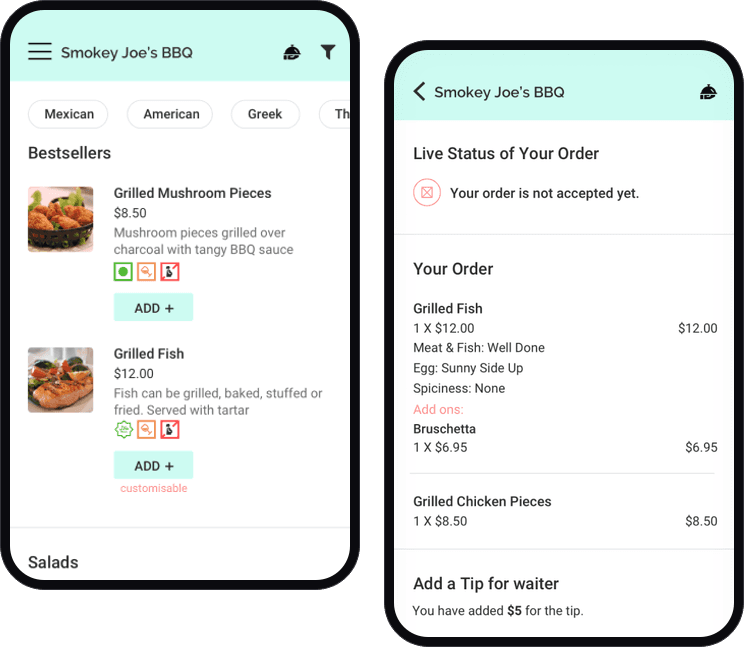
Two React Native apps, each with iOS and Android from one codebase plus a web app, from restaurant ordering to group payments.

The client chose React Native apps over a plain QR web page, because diner accounts let it keep its own record of regulars. One codebase serves iOS and Android in four languages, with order status pushed over WebSockets. The client’s list of loyal diners sits in its own database, ready for a membership scheme.
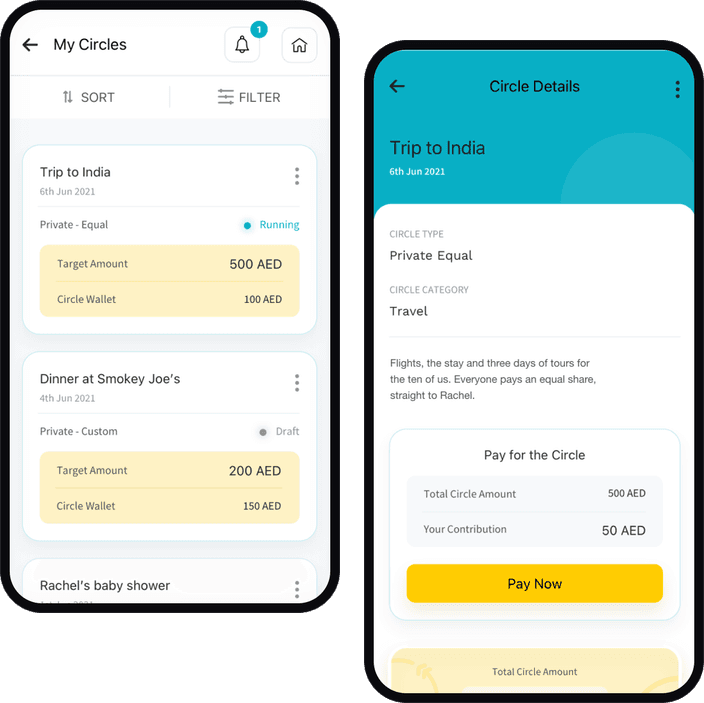

Android and iOS apps in React Native, built beside a React web app, so one team’s skills cover mobile and web. Each share is paid through Dapi straight to the organizer’s bank account, so the app never holds money. Organizers see each group’s collected total grow as friends pay in the app.
Clients whose React Native apps we built, from Clutch, where we hold a 4.9 average across 45 reviews. Quotes are the reviewers’ own words; the result lines are ours.
The apps continue to work incredibly well for us.
The result
Apps delivered on budget and on time, and still working well.
CEO, Software Company
Food-ordering software
They’re businessminded, which reflects on the team well.
The result
Platform delivered on time and on budget, because early stress-testing prevented overruns.
CEO & Co-Founder, Gift-Funding Platform
Gift funding
Whatever we expected, Techuz delivered it.
The result
The new feature works just as intended, delivered within budget with consistent communication over Slack.

Executive, FinTech Company
Financial services
A small React Native app takes 3–6 weeks, a medium one 8–12 weeks and a large one 3–5 months, with the first store review inside those totals. Upgrade time depends on how far behind the app is.
Small app, or an upgrade plus a few features
3–6 weeks
About a week of audit or discovery, 1–2 short sprints with the upgrade first, then UAT and store release in the final week
Medium takeover or new build
8–12 weeks
Takeover: 1 + 2–3 + 4–6 + 1–2 weeks. A new build swaps the upgrade for 1–2 weeks of design and architecture and runs 5–7 weeks of sprints
Large app
3–5 months
Multi-role apps or heavy integrations, built in phases
A React Native app with Techuz costs $10k–15k for a small build, $25k–50k for mid-size and $50k+ for large, built in phases. Takeovers and mid-size builds start with a one-week Discovery Sprint ($1,500–2,000, fixed), which covers the code audit and ends in a fixed estimate.
$10k–15k
Small
3–6 weeks
A simple cross-platform app with 1–2 roles, or an upgrade plus a few features
$25k–50k
Mid-size
8–12 weeks
iOS and Android apps with an admin panel, payments, booking or real-time updates
$50k+, built in phases
Large
3–5 months
Multi-role apps or heavy integrations
Small
3–6 weeks
A simple cross-platform app with 1–2 roles, or an upgrade plus a few features
$10k–15k
Mid-size
8–12 weeks
iOS and Android apps with an admin panel, payments, booking or real-time updates
$25k–50k
Large
3–5 months
Multi-role apps or heavy integrations
$50k+, built in phases
Every price includes QA, project management, store release under your accounts and 30 days of free support. Rates are $20–25 an hour, by role and seniority. Store fees, third-party APIs and hosting are extra, and we show the monthly running cost before you approve.
With practices you can check in the code and the store consoles, not badges. Apple and Google tighten their upload rules every year, so we plan for them from the first sprint. Each release is checked against the OWASP MASVS checklist.
We keep the stack your app already has where it works, and explain any change we suggest in the audit.
One typed codebase for iOS and Android, linted on every pull request
APIs and admin panels built with the app. See backend development.
Databases and storage in your own cloud account
A build on your phone each sprint, crash alerts after launch
Integrations shipped in our mobile apps
Models and document search, with prompts and test sets versioned
Techuz isn’t the right fit if your users are mostly on desktop, where a PWA costs less and skips store review. 3D games, AR/VR, watch and in-car apps need a specialist studio, not us. React Native apps also need a yearly upgrade budget, since each release is supported for a limited time.
React Native is an open-source framework from Meta for building iOS and Android apps from one JavaScript codebase, using React. It renders native components, so each app feels at home on its phone. Techuz uses it for takeovers and upgrades, and for new apps when the client’s team writes React.
Yes, for teams that already write React or run an app in it. React Native keeps shipping regular releases, and Techuz support plans keep client apps on a supported one. For a brand-new app with no React team, Techuz usually recommends Flutter.
Yes, Techuz can take over your React Native app from another agency, starting with an audit of the code, libraries, store accounts and backend. You then get a plan to upgrade, fix and extend, or move to Flutter, and we fix whatever blocks your next release first.
Yes, Techuz provides dedicated React Native engineers to join your team, from 160 hours a month each, at $20–25 an hour by role and seniority. We shortlist profiles in 2–4 working days, engineers start in 1–2 weeks, and a replacement comes within 2 weeks at no cost. See our dedicated development team, or how to hire React Native developers.
Moving your React Native app to Flutter only makes sense if it pays off. Techuz recommends Flutter when the app needs a large rewrite anyway, when key libraries are abandoned, or when you want a Windows version. If your team writes React and the app is close to current, upgrading costs less.
Yes, when your own team writes React and will run the app, or the app shares logic with a React web app. For other new apps, Techuz builds in Flutter by default and puts the reason for that choice in writing before design starts.
Tell us what you're building. We reply within 24 hours and send a ballpark estimate within 48.


