
One codebase instead of three apps
One team builds one app for web, Android and iPhone. You pay for one build and one release, not two native apps plus a website.

Customers install your app from the browser on iPhone, Android or desktop and get every update instantly. One codebase costs less than building and running two native apps.
4.9 on Clutch from 45 reviews · 500+ projects since 2013 · Auto-scaling for weekend ticket rushes
Our PWA development services launch your iPhone and Android app from your web platform, fast and at lower cost. For web-driven apps, users get the same experience, and you can move to native as you grow.
Installable apps built from scratch on Next.js, React or Angular, with a light app shell that opens fast on any phone. You launch on every device at once, without waiting for a store to approve each release. See custom web application development.
Turning an existing website or web app into a PWA means adding a manifest, a service worker and offline screens to the code you already run. Your customers get an app they can install, and you skip paying for a rebuild. Read the signs it’s time to modernize your web app.
Forms, carts, bookings and field reports keep working without signal: data is saved on the device and synced once the connection returns. Field teams and customers stop losing work to a dead zone, and your records stay complete.
PWA push notifications and home-screen badges bring users back when an order ships or a booking changes. Mobile users accept only 16% of notification prompts (HTTP Archive Web Almanac 2025), so well-timed requests win the repeat visits.
Our PWA ecommerce development turns your storefront into an app shoppers install from the browser, with saved carts, fast product pages and one-tap reorders. Shoppers come back from the home screen instead of a search, and your store keeps the sale. See ecommerce development.
We add search that understands plain questions, form-filling assistants and recommendations built on your own data to the app your users already installed. Customers get answers in a few taps, and new AI features reach them without a store update. See our AI development services.
PWAs are one part of our web development services, most often for ordering, booking, field inspections, learning and online stores.
When you want your app on phone and desktop fast and on one budget. One codebase reaches every user, installs without an app store and keeps working when the signal drops.
A PWA is one app, but each platform decides how it installs, sends alerts and syncs. We map every feature against each platform in discovery, so nothing goes into your plan that an iPhone can’t deliver.
Chrome has removed the PWA score from Lighthouse, so a “Lighthouse PWA audit” no longer proves much. We check installability in Chrome DevTools instead.
Need Bluetooth, NFC, background location or an App Store listing on day one?
We’ll say so in discovery and quote a Flutter app instead. See our mobile app development.
Build a PWA when most users find you through search or links and the core features run in a browser. Build a native or Flutter app when the App Store listing or the phone’s hardware is the product itself.
Not sure which fits?
Book a 30-minute call and a tech lead will map your features to each platform with you. See our technical architecture work.
Three US web apps built on the stack we use for PWAs. Each works on any phone; one is rendered for search, one scales for release-weekend peaks.

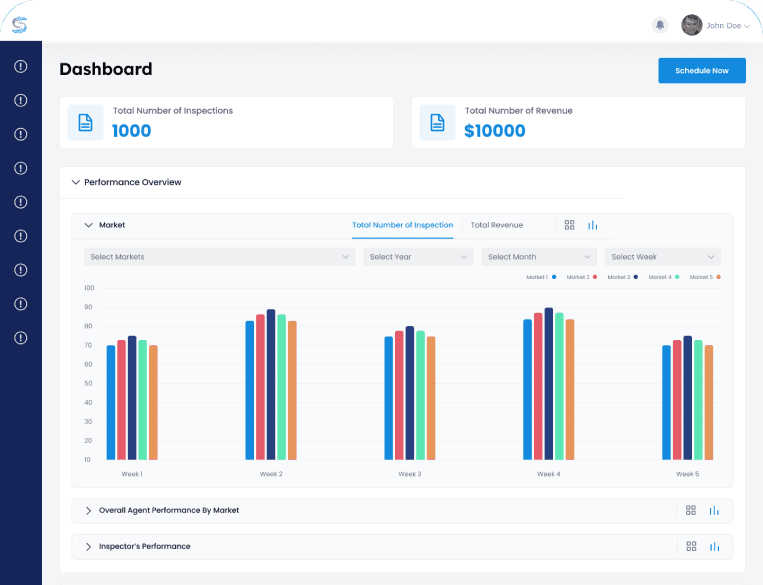
Realtors, vendors, employees and customers book inspections, generate reports and track tasks in one web app, which now produces 800+ reports a month.
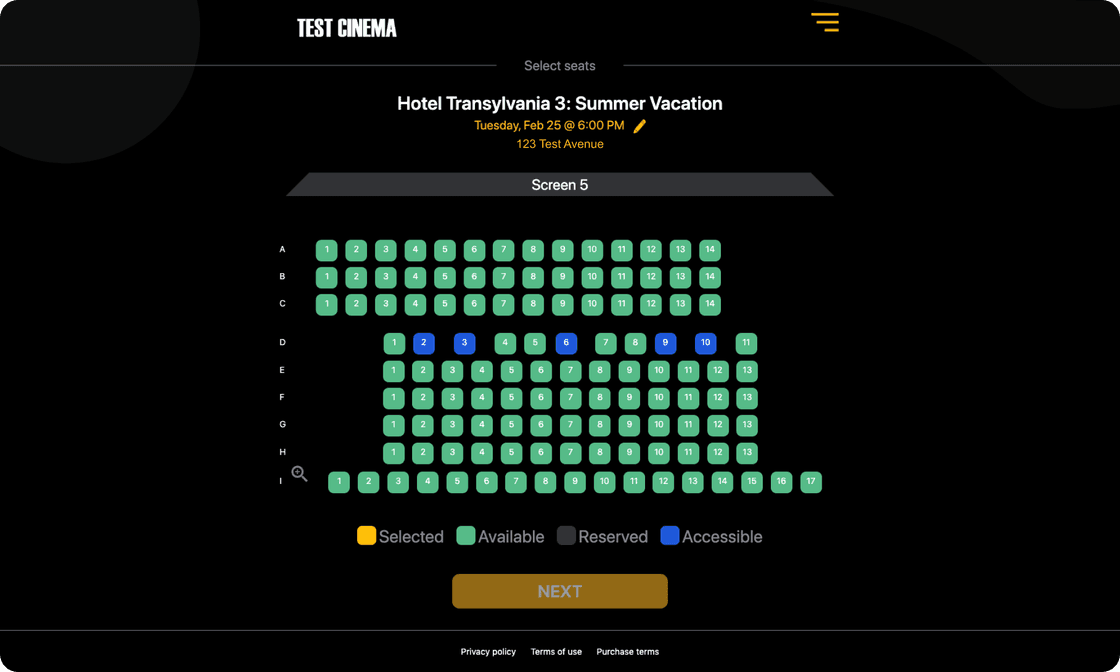

Moviegoers pick seats from theater seat layouts and pay with gift cards or promo codes, linked to the RTS theater system. AWS auto-scaling absorbs release-weekend rushes, with 800–1,500 people on the platform at once on a big release weekend.
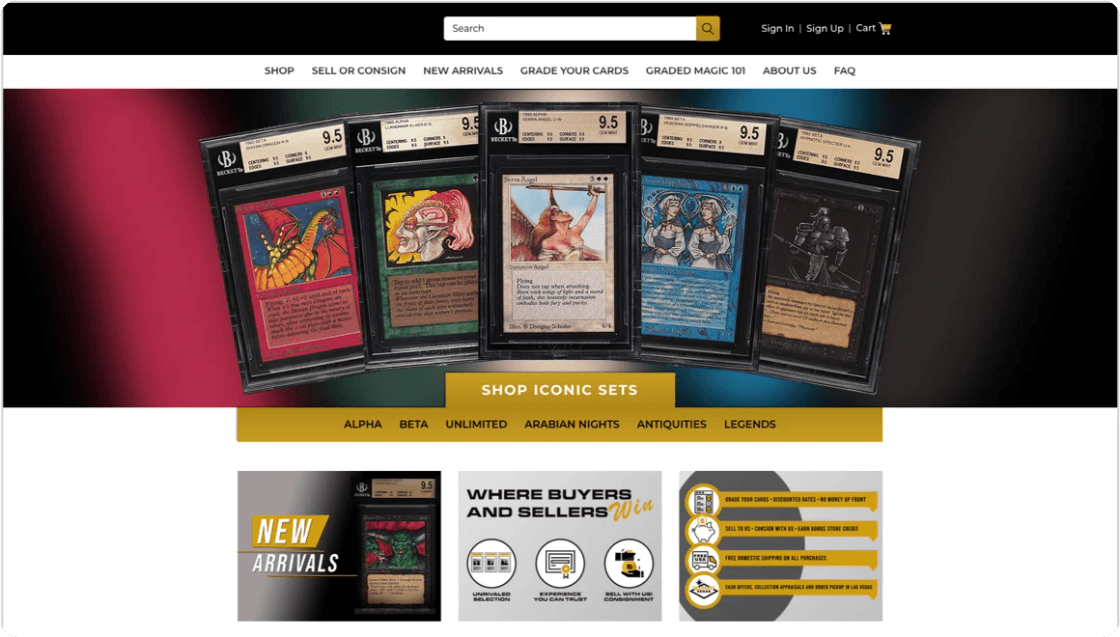

A collectible card marketplace rendered on the server with Angular Universal, so every card listing can be found in search. Grading, listings and PayPal checkout sit in one place, and 1,200+ cards have sold.
Reviews of the three web apps above, from Clutch, where we hold a 4.9 average across 45 reviews. Quotes are the reviewers’ own words; the result lines are ours.
Most impressive was their ability to take my requirements, build a scope document and follow it.
The result
Weekly Zoom updates and a revised scope of work kept the project flexible as needs changed.
Kevin Lewis, CEO, Schedash
Real estate SaaS
The platform is live, fully functioning and earning money.
The result
Positive initial feedback on the launched ticketing platform, with more features in progress and fast support.
CEO, Consulting Firm
Online ticketing
I’m very happy with the final product.
The result
A satisfactory final product, with bugs fixed and minor changes made after launch based on the client’s feedback.
Founder, Collectible Trading Cards Company
Collectible trading cards
A small PWA takes 4–8 weeks, a mid-size app 10–12 weeks and a large platform 4–6 months once the scope is clear. Across the 8+ projects we built with Claude Code in the last year, delivery took up to 50% less time than comparable builds the year before.
Small PWA
4–8 weeks
An existing web app turned into an offline-ready PWA, or one new core flow
Mid-size app
10–12 weeks
New PWA with push, offline sync, payments and 2–3 integrations
Large platform
4–6 months
Multi-role platform with offline sync at scale, built in phases
Every PWA runs through the same six phases, tested on real phones before launch.
A PWA with Techuz costs $5k–8k for a small build, $10k–15k for a mid-size app and $15k–30k for a large platform built in phases. Rates are $20–25 an hour, depending on role and seniority.
$5k–8k
Small
4–8 weeks
$10k–15k
Mid-size
10–12 weeks
$15k–30k
Large
4–6 months
Small
4–8 weeks
$5k–8k
Mid-size
10–12 weeks
$10k–15k
Large
4–6 months
$15k–30k
Every price includes QA, project management and 30 days of free support. Hosting, push services and AI usage are listed with monthly costs in the proposal.
Prefer to hire PWA developers by the month? Work with a dedicated team. See engagement models and pricing, or read the web app development cost guide.
Offline use means some data lives on the phone. So we decide in the architecture what gets stored there, for how long, and who can reach it.
AI features follow the same rule: an assistant only sees the data the signed-in user is allowed to open.
We pick the framework your team can run after launch, and explain the choice in writing.
Install, offline use and push
Business data, caching and background jobs
Models, document search and agents; prompts and test sets versioned
If you need an App Store listing, Bluetooth or NFC on day one, a PWA is the wrong tool. A brochure site needs only a WordPress PWA plugin. And a multi-role app under about $5k is better cut to one core flow first.
A progressive web app (PWA) is a website built to behave like an installed app. It installs from the browser, opens in its own window, works offline through a service worker and sends push alerts. One codebase runs on iPhone, Android and desktop.
Yes, PWAs work on iPhone, and since iOS 26, Add to Home Screen opens a site as a web app by default. Push alerts work from iOS 16.4, but only after the user adds the app to the Home Screen. Safari shows no install prompt, so Techuz designs a short install guide.
Yes, Techuz can turn your existing website into a PWA. We audit the code, then add a manifest, a service worker, offline screens and push where it helps. A conversion usually fits the small tier: $5k–8k and 4–8 weeks. If the site needs fixing first, we’ll say so before you pay.
Google Play, yes, as a Trusted Web Activity, and the Microsoft Store accepts PWAs too. Apple’s App Store rejects apps that are only a repackaged website (guideline 4.2). If an App Store listing matters, Techuz would build a Flutter app instead, from the same feature list.
A small PWA or conversion takes 4–8 weeks, a mid-size app 10–12 weeks and a large platform 4–6 months once the scope is clear. With Techuz, large platforms launch the core flow first, so part of the app works for you sooner.
Ask what your app will and won’t do on an iPhone before you sign. Ask how they test offline use and updates on real phones. Check that the code and hosting sit in your own accounts, and read verified reviews. Techuz holds 4.9 on Clutch from 45 reviews.
Four things you can check before you sign.
Tell us what you're building. We reply within 24 hours and send a ballpark estimate within 48.


