Android app development services built for real‑world phones

We build native Android apps in Kotlin for products where speed, battery life and phone features matter, and make them run well on the budget phones your users carry.

4.9 on Clutch from 45 reviews · 500+ projects since 2013 · A native puzzle game with 5M+ Google Play downloads

Our Android app development services

Our Android app development services build native Kotlin apps for founders and product teams whose product lives on speed, media or deep phone access: games, readers, video and long-session apps. They run well on budget phones and flagships alike.

  • Native Android apps in Kotlin

    Native Android app development in Kotlin and Jetpack Compose suits products where speed, animation or the phone’s own features are what users pay for. Your app gets new Android features as soon as Google ships them.

  • Apps for tablets and foldables

    Tablet and foldable layouts adapt to large screens instead of stretching a phone screen. Android’s next target level makes this mandatory, so building it now saves a redesign later.

  • Android UI/UX design

    Android UI/UX design starts with Figma screens that follow Material patterns, then a clickable prototype you can test before any code. You approve every screen before sprint 1, so the build budget goes into features. See UI/UX design.

  • Backend, admin panel and APIs

    Your app’s backend, admin panel and APIs are planned in the same estimate as the app, with roles mapped up front. From launch day, staff can approve accounts, issue refunds and check reports. See backend development.

  • Android app takeover and modernization

    Inherited Android apps get a code review and a list of gaps first, then an upgrade to Google Play’s current target level. You keep what works and fix what blocks updates. See technical architecture review.

  • Android app maintenance and Google Play updates

    Maintenance plans of 40, 80 or 160 hours a month cover Google Play’s yearly target-level update, quarterly SDK upgrades and store policy changes. Your app keeps installing and updating.

Need the same app on iPhone?

Built for the Android phones your users really carry

Android runs on thousands of phone models at once. We agree your device range in discovery and test on it every sprint. The app stays inside Google Play’s yearly rules.

The device matrix

We test on the last 4–5 Android versions. Test phones include a low-end 2–3 GB model, a mid-range Samsung, a Pixel and a Xiaomi- or Oppo-class phone, plus tablets if in scope. Counterpoint Research’s June 2026 forecast points to “longer replacement cycles”, so older phones stay in use for years.

App size and first launch

On low-end phones, app size and startup time decide whether people keep an app. The tech lead sets a size and first-launch budget and measures it on our 2–3 GB test phone every sprint. A heavy build gets fixed before release.

Battery and background limits

Since March 2026, Google Play can warn on an app’s store listing when it keeps the phone awake too long with the screen off. It can also leave the app out of recommendations. A staged rollout pauses if a build crosses Google’s Android vitals thresholds for crashes, freezes or battery drain.

Aug 31, 2026API level 36 required

Google Play’s yearly target API

From August 31, 2026, new apps and updates must target Android 16 (API level 36) to be submitted to Google Play. Google offered an extension to November 1, 2026. Existing apps below API level 35 stop showing to new users on newer phones. We plan the update in June and ship it before the deadline.

Since Sep 30, 2026Global in 2027

Developer verification

Since September 30, 2026, apps installed from participating stores on certified Android devices in Brazil, Indonesia, Singapore and Thailand must come from verified developers. Google plans to expand this globally in 2027. In discovery we check your Play Console verification and register any builds you share outside Google Play.

Native Android or Flutter: which does your app need?

Choose native Kotlin when performance, animation, protected media or long sessions are the product, or when you’ll run separate Android and iOS teams. Choose Flutter for business apps that should look the same on both phones. Your requirements document records the choice and why.

How native Android and Flutter compare

How native Android and Flutter compare
Native Android (Kotlin)Flutter (Android and iOS)
Phone access the app needsDeep OS access and new Android APIs firstStandard features: camera, push, maps, payments
Speed and animationSmoothest option on low-end phonesSmooth for most business apps
Codebases you maintainOne per platformOne for both platforms
Adding iOS laterA second app, built in SwiftAlready covered
Team after launchA Kotlin developer, plus a Swift developer for iOSOne Flutter team
Apps it suitsGames, encrypted readers, video, long sessionsBooking, marketplace, field-worker, content and dashboard apps
Our exampleSmartBrain, a puzzle game built in Kotlin and SwiftA healthcare messaging app on Android, iOS and Windows from one Dart codebase

Not sure yet?

Compare all three options on our mobile app development page, or see Flutter app development.

Work from our Android app development company

A puzzle game live on Google Play, a club’s tennis match app and a pet products marketplace.

SmartBrain logo

SmartBrain

Brain-puzzle game

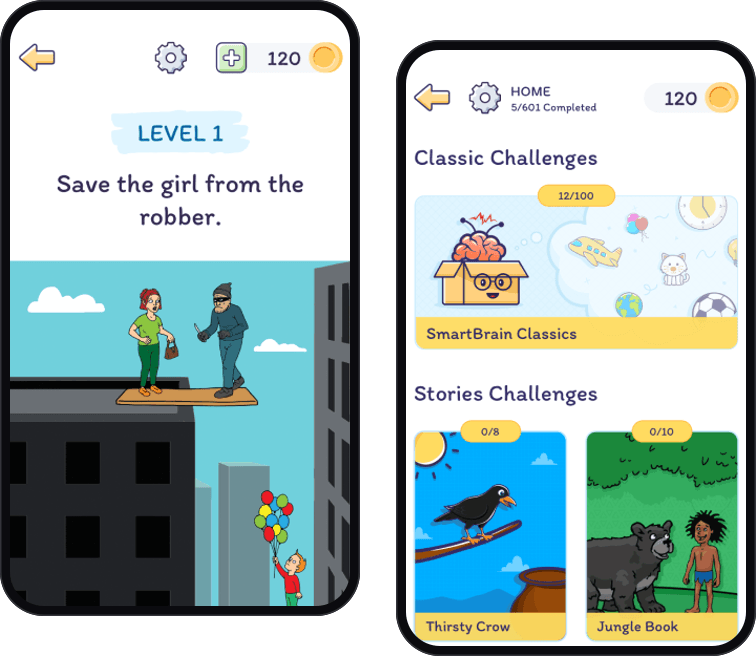
Two mobile developers built it natively, Kotlin for Android and Swift for iOS, with no game engine, so the app stayed lean and light. Touch controls, several languages and a high-contrast design let anyone pick up its 250+ levels. Its Google Play listing shows more than 5 million downloads.

Team
Team of 7
Timeline
About 1 year
Budget
$10k–50k
SmartBrain — Brain-puzzle game
Client logo

PlayMore Tennis

Tennis match app, Northern Ireland, UK

PlayMore Tennis, a match app with 2K+ players and 15K matches. Players schedule singles or doubles and invite a friend, all their friends or anyone at their 0–10 level, on iOS, Android and the web.

Team
Team of 3
Timeline
3+ years of build and support
Budget
$50k–199k
PetLink — Pet products and services marketplace
PetLink logo

PetLink

Pet products and services marketplace

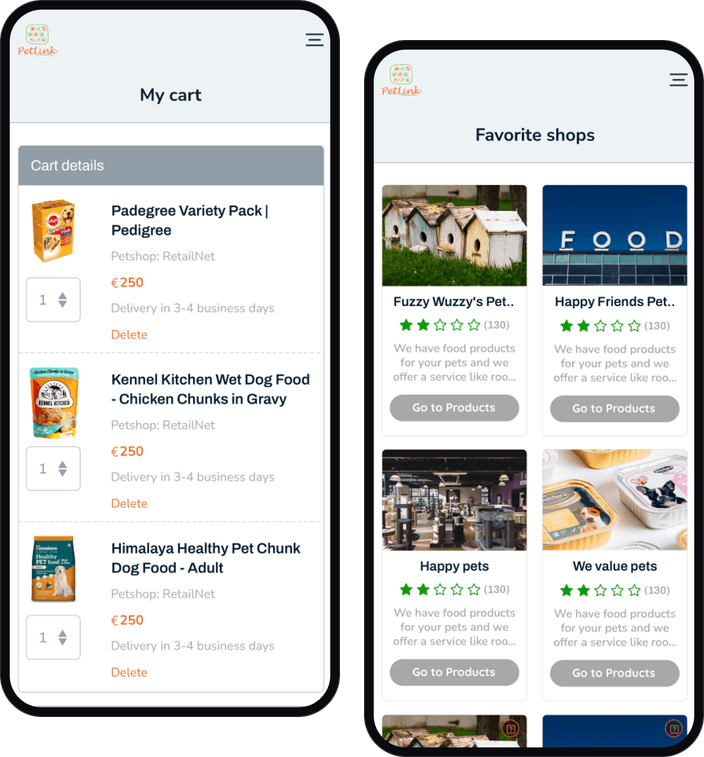
Pet owners searched products, services and nearby shops on Google Maps from native Android and iOS apps built for this two-sided marketplace. Each shop ran appointments and stock from its own dashboard, with reports on sales, users and orders.

Team
Team of 7
Timeline
About 7 months
Budget
$10k–25k

How we build your Android app, step by step

Seven phases take a medium Android app to Google Play in 8–12 weeks; small apps compress them. Across the 8+ projects we built with Claude Code in the last year, delivery took up to 50% less time than comparable builds the year before. Testing an idea first? Start with mobile MVP development, usually 8–12 weeks.

Typical length, first Google Play review included
  • Small app

    3–6 weeks

    Discovery and design in about a week, 1–2 short sprints, then UAT and release

  • Medium app

    8–12 weeks

    The seven phases below

  • Large app

    3–5 months

    8–14 weeks of sprints, release overlapping UAT

The seven phases

Your Android app developers

A mobile lead with 6+ years’ experience runs your project, and Android developers with 3–5 years in Kotlin build it, with backend, QA, design and project management alongside. We can add developers in 1–2 weeks or set up a dedicated development team.

How much does Android app development cost?

A small Android app costs $10k–15k with Techuz. Mid-size apps run $25k–50k, and large multi-role apps start at $50k, built in phases. Rates are $20–25 an hour.

Steps not to scale
  1. Small

    3–6 weeks

    One Android app with 1–2 user roles, sign-in, push notifications and a simple admin panel

    $10k–15k

  2. Mid-size

    8–12 weeks

    An Android app (plus iOS if needed) and admin panel, with payments, maps or booking for 2–3 roles

    $25k–50k

  3. Large

    3–5 months

    Native apps for several roles, with real-time features, video, offline sync, AI or compliance needs

    $50k+, built in phases

What moves the price

  • The phones and Android versions you support
  • The number of roles
  • Payments, maps or chat
  • Offline sync
  • AI or compliance
  • A rushed timeline or a native iOS app

What’s included

Every price includes design, QA on the agreed phones, project management, the Google Play release and 30 days of free support. Google Play’s $25 one-time developer fee, third-party SDK fees and hosting sit outside it; you see the monthly running cost before the build is approved.

How do we keep your Android app and its data secure?

With practices you can check, not badges: every release is checked against the OWASP MASVS checklist. Where your app handles patient data, we build to HIPAA requirements.

Keys and tokens kept out of reach

Login tokens sit in the Android Keystore, no API keys or secrets ship inside the app, and every call uses HTTPS. Unpacking your app reveals nothing reusable. See application security.

Access checked on the server, role by role

The server checks each request against the user’s role, so a modified app can’t open another user’s data or admin screens.

Signing keys and Play Console in your name

The signing keystore is created in your name and handed over through a password vault. The app lives in your Play Console, so you can move it anytime.

An honest data safety form

The data safety form matches what the app really collects, each permission request says why, and users can delete their account in the app.

Payments tested end to end

Sandbox tests cover failed, partial and refunded payments before every release. Digital goods go through Google Play Billing where store rules require it.

Technology we use for Android apps

Kotlin for native apps, Flutter when one codebase fits better, and a backend your team can run after handover.

  1. Android

    Native speed and full access to the phone

    • Kotlin
    • Jetpack Compose
    • Android SDK
    • Android Studio
    • Javaolder apps we take over
  2. Cross-platform

    One codebase when Android and iOS should match

    • Flutter
    • Dart
  3. Backend and cloud

    APIs and admin panels your team can run

  4. App services

    Push, crash reports, maps, payments and engagement

    • Firebase Cloud Messaging
    • Firebase Crashlytics
    • Sentry
    • Google Maps and Places
    • Stripe
    • PayPal
    • Razorpay
    • CleverTap
    • MoEngage
  5. Delivery and QA

    Checks on every pull request and build

    • GitHub Actions
    • Android Lint
    • Play Console internal testing
    • In-house real-device lab
  6. AI

    AI features call models through your backend, so keys never sit in the app

    • OpenAI
    • Claude

Android app development FAQ

  • If your users mostly sit at a desktop or open the product rarely, Techuz would point you to a PWA. It costs less to run and needs no store review. 3D games, AR/VR, smartwatch, TV, car and Bluetooth-first hardware apps belong with a specialist studio. Without money set aside for yearly updates, you can’t ship even a bug fix to Google Play after its next August target-API deadline.

  • Android app development is designing, building, testing and publishing apps for Android phones and tablets, usually in Kotlin, through Google Play. At Techuz, it also covers the backend, the admin panel and the yearly updates Google Play requires.

  • Kotlin is the main language for new native Android apps, and it’s what Techuz uses. Many older apps use Java, which we keep maintaining when we take one over. When one app should cover Android and iOS, we build it in Dart with Flutter.

  • Techuz delivers a small Android app in 3–6 weeks, a medium app in 8–12 weeks and a large one in 3–5 months. Each total includes the first Google Play review and any fixes reviewers request.

  • Start with the platform most of your users are on, Android or iOS. In StatCounter’s October 2026 data, Android held 72.36% of mobile OS share worldwide, while iOS held just over half of US share. Techuz writes a platform note in discovery from your own users’ data, and Flutter covers both phones when you can’t choose.

  • Yes, Techuz publishes every app in your own Google Play Console, with the signing keystore and code in your name from the first build. A verified developer account keeps it installable as Google’s verification rules spread.

  • Yes, Techuz can take over and update your existing Android app. We pull a crash report by device and review the code first. Then we fix whatever blocks your next Google Play update, such as an old target API level or an outdated SDK.

Get a Ballpark Estimate for Your Project

Tell us what you're building. We reply within 24 hours and send a ballpark estimate within 48.

Tell us about your project

A few lines are enough. We reply within 24 hours.

By sending this form I confirm that I have read and accept the Privacy Policy