
A daily habit, not a one-week download
Rewards for real progress, such as finishing a lesson or passing a short quiz, plus streaks that grow day by day, build a routine. Retention, not installs, renews a subscription.

We build iOS and Android learning apps, from children’s reading apps to exam-prep and skills apps, that learners open again tomorrow and parents trust.
4.9 on Clutch from 45 reviews · 500+ projects since 2013 · Learning products since 2017
Our education app development services build iOS and Android apps for children, exam-prep students and adult learners. We start from the one daily habit your app must create, so startups reach the stores sooner and schools give learners a reason to return.
Reading and early-learning apps for children put a parent in charge of the account and reward real progress with points, streaks and badges. Parents keep paying for an app their child asks to open.
Students revising for school exams or entrance tests get video lessons, timed mock tests and a fresh practice quiz on the phone they already carry. Weekly progress they can see is what keeps a subscriber renewing. See video learning platforms.
Our elearning app development services give the web courses you already sell a native home on iPhone and Android, with synced progress and push reminders. Learners finish more of what they bought, and your web platform keeps running. See custom eLearning development.
Elearning app development for adults means short lessons, reminders tied to each learner’s progress and certificates worth sharing. Completion rates rise, and completion is what employers and paying learners judge you on. See microlearning app development.
School apps give pupils, teachers and parents their own view, with QR or PIN sign-in for young children and lessons in more than one language. Schools roll out an app faster when it fits the way their classrooms already run.
Taking over a learning app that crashes or fails store updates starts with a code audit, then fixes in order of what hurts learners most. You keep your users, ratings and store listing instead of starting again.
Building the platform behind the app as well?
A learning app earns its money from learners who come back. The complaint we hear most from EdTech founders is simple: kids download the app, use it for a week, and disappear. These four things change that.
Educational app development starts with who is holding the phone. A seven-year-old, a teenager revising for an entrance exam and an adult learning between meetings need different sign-in, rewards and privacy settings. We design those three things first, because they are the hardest to change after launch.
Start with an app when learners use their own phones every day, on their own. Start with a web platform when teachers or employers assign courses that people take on laptops. Many products end up with both, running on one API.
Learners at a desk, assigned by a school?
Look at custom LMS development instead.
A children’s reading app and an exam-prep video app, for two ages of learner.

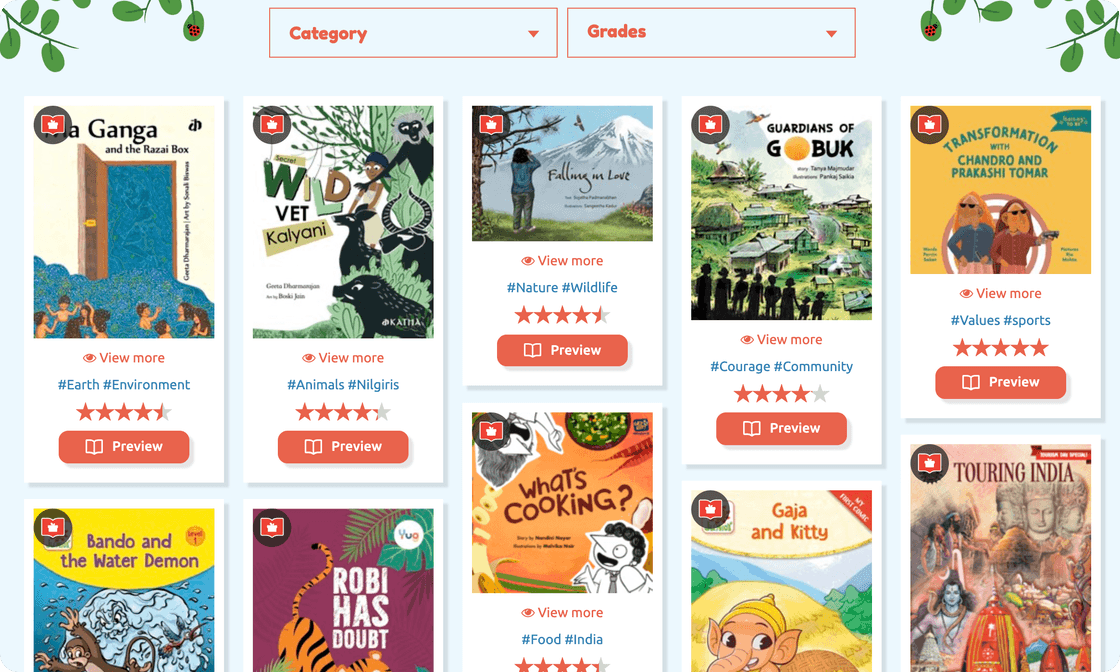
Native iOS and Android apps, tablet apps included, for a subscription library that children aged 7 to 12 read in-app. Each e-book page is encrypted, and the apps share one API with the web app, admin panel and a portal where publishers upload books. A paid reading competition later ran on the same apps and API, with certificates issued automatically.
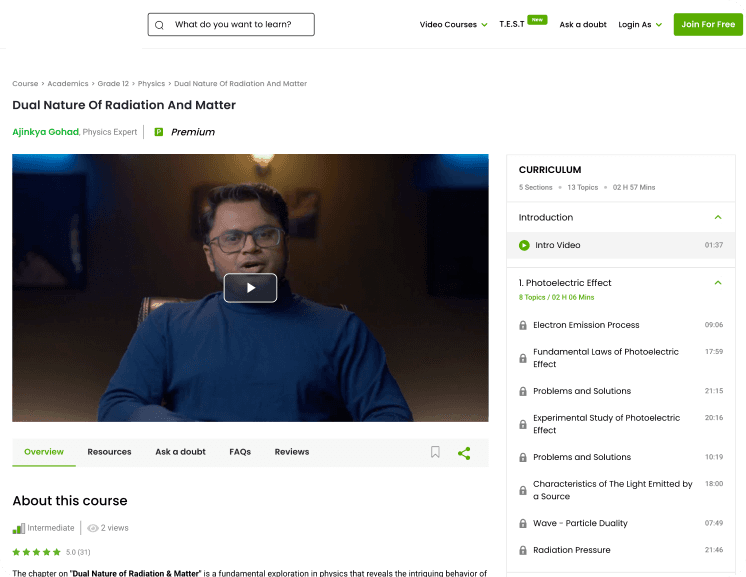

Native iOS and Android apps and a web platform for Grade 11 and 12 students preparing for JEE and NEET. Lessons stream as adaptive HLS and each video chunk is served through a signed link. A GPT-4 practice tool writes a new board-aligned quiz on every request; AI practice quizzes have run in production since 2023.
Reviews from clients whose learning and mobile apps we built, from Clutch, where we hold a 4.9 average across 45 reviews. Quotes are the reviewers’ own words; the result lines are ours.
They never look for shortcuts, and I know they won’t cheat me.
The result
A partner as invested in the product’s success as the founder.
CEO, E-Learning Company
They’ve been very good. I’m very happy.
The result
Over 200 users, more members playing new opponents, and higher overall club usage.
Brian Cushnie, Director, Wallace Park Indoor Tennis Center
Tennis club
Whatever we expected, Techuz delivered it.
The result
The new feature works just as intended, delivered within budget with consistent communication over Slack.

Executive, FinTech Company
Financial services
A small learning app takes 3–6 weeks, a mid-size app 8–12 weeks and a large one 3–5 months. Each total includes the first store review. Phases 1–5 below describe a mid-size app and add up to 8–12 weeks.
Small app
3–6 weeks
One learner role, lessons or quizzes, reminders
Mid-size app
8–12 weeks
Learner plus parent or teacher, subscriptions, rewards
Large app
3–5 months
Several roles, video or live classes, two languages, AI
Education app development with Techuz costs $10k–15k for a small app, $25k–50k for mid-size and $50k+ for large, built in phases. Rates are $20–25 an hour, depending on role and seniority.
$10k–15k
Small
3–6 weeks
One learner role: lessons or quizzes, sign-in, push reminders and a simple admin panel
$25k–50k
Mid-size
8–12 weeks
Learner plus parent or teacher roles, subscriptions, rewards and streaks, video lessons
$50k+
Large
Built in phases · 3–5 months
Several roles, adaptive video or live classes, two languages, AI practice, a rollout across schools
Small
3–6 weeks
One learner role: lessons or quizzes, sign-in, push reminders and a simple admin panel
$10k–15k
Mid-size
8–12 weeks
Learner plus parent or teacher roles, subscriptions, rewards and streaks, video lessons
$25k–50k
Large
Built in phases · 3–5 months
Several roles, adaptive video or live classes, two languages, AI practice, a rollout across schools
$50k+
Every price includes QA, project management and 30 days of free support.
Store fees, hosting, video and AI usage are billed to your own accounts and listed in the proposal.
By collecting less and recording who sees what. Children’s privacy rules such as COPPA in the US expect a written limit on how long you keep each kind of data.
More on children’s privacy and safety in education software.
New apps start in Flutter, one codebase for iPhone, Android and tablet.
One codebase by default; native for heavy media
One API for learners, parents, teachers and admins
Smooth playback on weak connections; protected files
Nudges at the right moment; subscriptions
Practice quizzes and smarter search, called from our back end
An education app is a mobile app that helps people learn, from children’s reading apps to exam-prep and language apps. Techuz builds them for iPhone, Android and tablet. Most connect to an admin panel where your team manages content, learners and payments.
At Techuz, an educational app starts with a one-week discovery of your learners, their devices and the habit that should bring them back. Then come a prototype tested on real learners, two-week build sprints, device testing with a pilot, and store release. Need to test the idea first? Start with an MVP.
With Techuz, a small education app takes 3–6 weeks, a mid-size app 8–12 weeks and a large one 3–5 months. Each total includes the first App Store and Google Play review. Content that is ready on day one keeps a project at the short end.
Yes, Techuz can build learning apps for children under 13 and has built apps where a parent owns and verifies the child’s account, and where young pupils sign in without an email address. We design to the privacy rules in each market, such as COPPA in the US, and your legal adviser approves the setup.
Flutter by default, for one codebase on iPhone, Android and tablet. We choose native Swift and Kotlin when protected media or long reading sessions are the product.
Ask any educational app development company to show live learning apps, explain how they bring learners back, and say how they handle children’s data. Check that the code and store accounts are yours from day one. Techuz has done edtech app development since 2017 and holds 4.9 on Clutch from 45 reviews.
If your app is a game with heavy 3D or animation at its core, a game studio fits better. Techuz doesn’t write curricula or produce course content; your experts do that. And if all your learners take courses on laptops through an institution, an LMS may serve you better.
Tell us what you're building. We reply within 24 hours and send a ballpark estimate within 48.


