AI business process automation services for the work your team repeats

We automate the approvals, payouts, onboarding and reports your team still moves by hand, inside the systems you already run, so staff stop re-keying.

4.9 on Clutch from 45 reviews · 500+ projects since 2013 · Approval, payout and reminder jobs running in production today

Our business process automation services

Our business process automation services build the approvals, scheduled jobs and AI steps your operations run on, inside the product or tools you already use. We automate the process with the clearest payback first, then work down your list.

  • Approval and multi‑step workflows

    Custom workflow automation for approvals, sign-offs and hand-offs, with bulk approve, role rules and a record of whose desk each item is on. Requests stop stalling in inboxes, and nobody has to ask where things stand.

  • Scheduled jobs and background runs

    Jobs that run on a timer or a trigger: releasing payments, calculating earnings, sending reminders, purging old data. Work that used to wait for someone’s free afternoon now happens on time, every time.

  • AI steps inside your workflows

    AI workflow automation adds a model where a rule can’t do the job, such as reading a document or sorting a request. Your team keeps the judgment calls, while repetitive reading and typing runs on its own. See AI agent development.

  • Integrations that trigger the next step

    Your payment provider, e-signature tool, CRM and Google Workspace connect through their APIs and webhooks, so one system’s update starts the next action. Data is typed once and stays the same everywhere.

  • Documents and records created for you

    Invoices with tax worked out, agreements sent for e-signature and returned signed, and reports, all generated from data you already hold. Staff spend less time on paperwork, and every document matches the numbers behind it.

What automating a process changes for your team

Teams get back the hours lost to re‑keying, chasing and checking. In Frends’ May 2026 research by Sapio, European knowledge workers spent 7.6 hours a week on repetitive tasks that could be automated. Good workflow automation returns that time without hiding what happened.

Hours back from re‑keying and chasing

Data entered once flows to every system that needs it, and reminders go out on schedule. Nobody copies between spreadsheets or chases approvals by email.

Fewer errors where money and records move

Tax is calculated when an invoice is saved, and a payout can’t run twice from the same event. Mistakes get caught before they reach a customer or an auditor.

Every item visible, from request to done

Each request shows its current step, owner and full history. Managers see the queue without asking, and customers get faster answers.

Workflow automation services: which steps get rules, AI or a person?

Rules decide, AI reads and drafts, and people approve anything that moves money or changes a record. Automations go wrong when AI sits beside the process instead of inside it. On our builds, every AI step lives inside the workflow, with its own threshold and fallback.

Rules

Tax, routing, thresholds, deadlines and eligibility run as tested code. When the logic is known, a rule is cheaper, faster and easier to audit than a model, and AI only explains it.

AI steps

A model reads a CV or contract, drafts a reply, tags a request or suggests the next action. Each AI step has an agreed confidence threshold, and anything below it goes to a review queue.

People

Payments, refunds, account changes and anything regulated wait for a named approver. Overrides are logged with a reason, so the rules improve and trust holds.

Before build, the design labels every step as rule, AI or person, with the reason and the fallback, and your process owner signs it. Each exception queue gets a named owner on your side and an alert when items wait too long. See enterprise AI agents.

Custom automation, no‑code tools or RPA: which fits?

No-code tools suit light glue, and an RPA specialist suits legacy screens with no API. Core flows that touch money, compliance or volume belong in custom code, which is how we build most AI process automation.

Custom automation, no‑code tools or RPA: which fits?
Custom automation in codeNo-code tools (Zapier, Make, n8n)Desktop RPA (UiPath and similar)
Best forCore flows with money, compliance or high volumeNotifications and simple syncs between SaaS toolsLegacy desktop screens with no API
Cost as volume growsFlat hosting cost, no per-task feesPer-task bills grow with every runLicense per bot, plus upkeep when screens change
Errors and alertsRetries, logs and alerts on every stepFailures can go unnoticedBreaks when a screen layout changes
Who owns itYou: code, prompts and accounts in your nameThe platform account ownerThe RPA vendor’s platform
Techuz’s roleOur default way of buildingWe work with it if you already own itNot offered; we suggest a specialist or an API-level route

Not sure which process to start with?

Book a 30-minute call, or see custom software development for larger systems.

Work from our business process automation company

Three platforms where approvals, payouts, training and reminders run without anyone chasing them.

Client logo

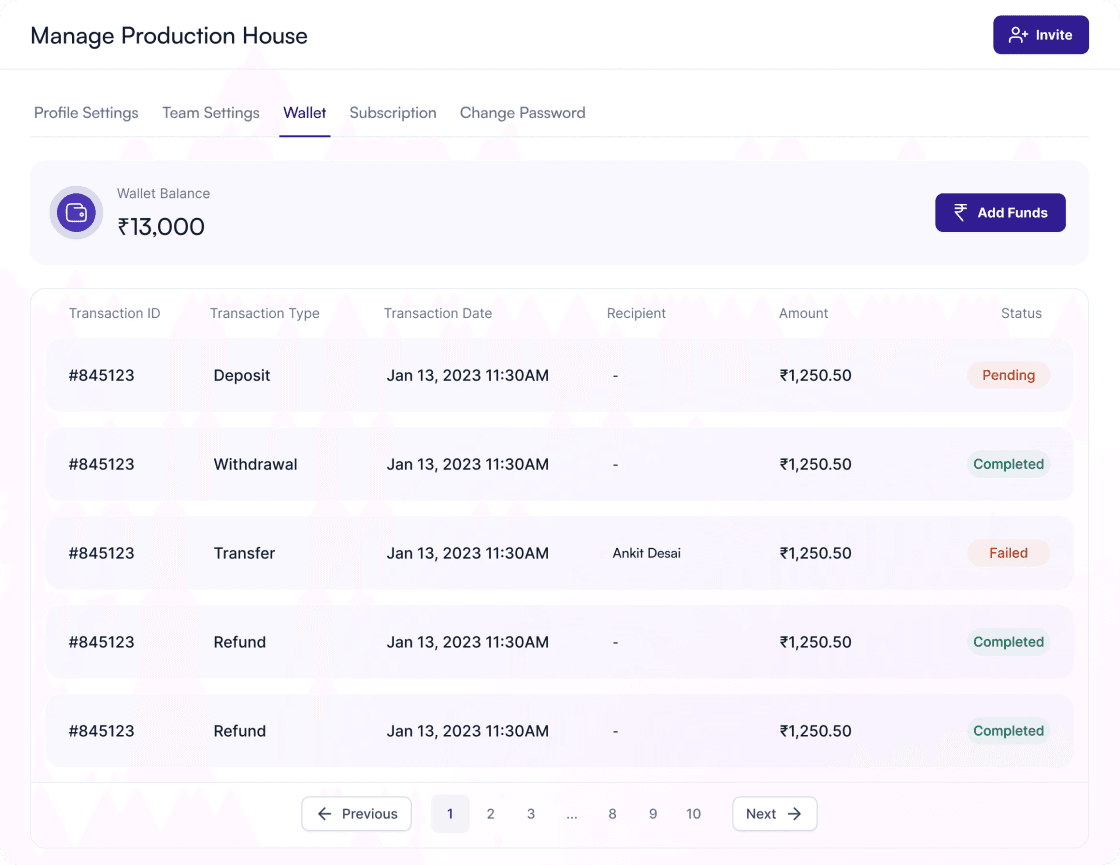
Crew payments platform for film and TV

Media production SaaS, India

Each production loads a prepaid wallet and pays hundreds of crew from it in one run. QR check-in on set feeds attendance, KYC is checked per project, and every invoice carries an auto-generated number. A whole crew is paid in one bulk payout, and nobody re-enters invoice data.

Team
5 people
Timeline
About 22 months, still supported
Budget
$50k–100k (whole platform)
Crew payments platform for film and TV — Media production SaaS
Live IT training marketplace — EdTech marketplace
Client logo

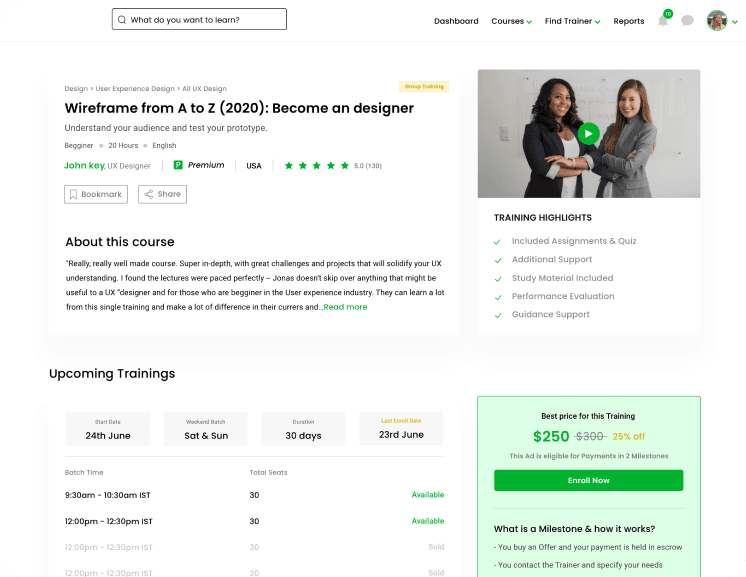
Live IT training marketplace

EdTech marketplace, India

An hourly job releases milestone payments to trainers as direct bank payouts, with GST collected at source, and class-join callbacks mark attendance. Learners get nudges when they stall at 50% or 75% of a video. Milestone releases ran every hour, with no one triggering them by hand.

Team
12 people
Timeline
20 months
Budget
Over $100k
Change control and e-signatures for medical device teams — Medical device SaaS
Client logo

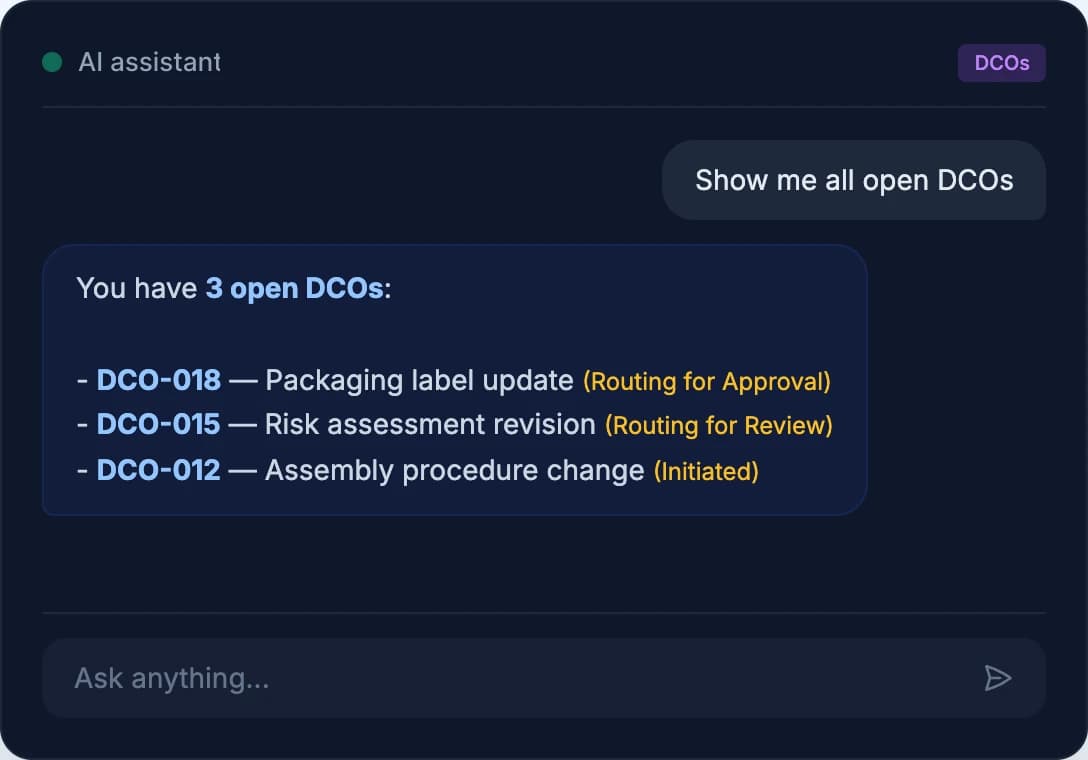
Change control and e-signatures for medical device teams

Medical device SaaS, USA

A change order routes to each approver in turn, and sign-off needs a password re-entry under FDA Part 11. When a revision goes live, the affected roles get training tasks without a manager assigning them. About 4,000 commits in year one.

Team
5 people
Timeline
13+ months, ongoing
Budget
$100k–250k

How we automate a business process, step by step

Most of the risk sits in discovery and testing, because a process mapped wrong just fails faster.

How long it takes
  • One workflow or integration

    4–6 weeks

    In a product you already run

  • 2–4 workflows with AI steps

    8–14 weeks

    Including a 2-week parallel run

  • Platform-level

    4–9 months

    Across departments, in phases

Five steps

How much does business process automation cost?

Business process automation with Techuz costs $10k–25k for one workflow, $25k–50k for several workflows with AI steps, and $50k+ for cross-department work, built in phases. Rates are $20–25 an hour, depending on role and seniority.

Typical cost by project size (steps not to scale).
  1. Pilot

    2–4 weeks

    A single AI step piloted on your own data, ending in a go/no-go

    $4k–10k

  2. Small

    4–6 weeks

    One workflow or one integration in a product you already run

    $10k–25k

  3. Mid-size

    8–14 weeks

    2–4 workflows, AI steps with review screens, 3–6 integrations

    $25k–50k

  4. Large

    Built in phases · 4–9 months

    Platform-level automation across departments and systems

    $50k+

What moves the price

  • Systems and how clean their APIs are
  • Document variety
  • The accuracy target
  • How much review you accept
  • Compliance
  • AI steps that write data

What’s included

Project management, QA, the parallel run and 30 days of free support after launch are all included. Running costs such as model tokens and vendor APIs are estimated monthly before you approve the build.

How do we keep automations safe and you in control?

With checks inside every step and ownership that stays with you. In Zapier’s April 2026 survey, 74% of US executives said losing their AI vendor would disrupt day-to-day operations.

Payments that can’t run twice

Provider webhooks are checked for signature and timestamp, each event is processed once, and database locks stop two actions racing. A replayed or forged event changes nothing.

No more access than its user

Every automated action runs with the permissions of the person or role that triggered it. If a check fails, the step stops and logs why.

A written AI data policy

Data goes to a model provider only with your written approval, with training off and zero-retention settings. Data that must stay in your cloud is handled by Azure OpenAI deployed inside your own tenant. See AI security.

Everything in your name

Code, prompts, rules, cloud, model keys and vendor accounts sit in your accounts from day one. You can switch models or vendors without rebuilding the workflow.

Technology we use for business process automation

Most of our automation is custom code inside your product or beside it, so it can be tested, versioned and monitored.

  1. Workflows and services

    Integration logic and webhooks in Node.js; AI and document services in Python

  2. Jobs and queues

    Scheduled and background work with retries

  3. Integrations

    Each system connected through its API, webhooks verified

    • REST
    • Webhooks
    • Google Workspace APIs
    • Zoho Sign
    • Stripe Connect
  4. AI

    Model chosen per job; prompts, rules and test sets versioned with the code

    • OpenAI
    • Claude
    • Azure OpenAI
    • Affinda
    • MCP
  5. Monitoring

    Failed jobs and webhook errors raise alerts

    • Sentry
    • CloudWatch
    • UptimeRobot

Business process automation FAQ

  • Techuz isn’t the right fit when a process runs a few hours a month or changes weekly; automation would then cost more than it saves. We don’t build desktop RPA, implement ERP or CRM platforms, or run company-wide change programs. We also won’t automate payments or regulated decisions with no human sign-off.

  • Business process automation is software that runs the repeatable steps of a process, such as approvals, data entry, payouts and reminders. Techuz builds it as rules and integrations in code, adds AI where a step needs reading or judgment, and keeps people approving what matters.

  • AI fits the steps a fixed rule can’t handle: reading a document, sorting a request, drafting a reply or picking the next action. Techuz connects the model through function calls or MCP and sets a confidence threshold. Low-confidence items go to a review queue, so the model never writes to your records unchecked.

  • Buy an off-the-shelf tool when it covers your process and volumes stay low. Build when the process touches money or compliance, spans several systems, or grows until per-task fees add up. Techuz often builds the core flow in code and keeps your existing tools for light tasks.

  • Multiply the yearly hours saved by the loaded cost of an hour, and add the cost of errors avoided. Then subtract the build cost and the yearly running cost. Techuz measures hours and error rates in discovery, before any build, and compares automated and manual output in the parallel run.

  • With Techuz, one workflow or integration takes 4–6 weeks. Two to four workflows with AI steps take 8–14 weeks, including a 2-week parallel run, and platform-level automation takes 4–9 months in phases. Vendor API access is the usual delay, so we ask for it in week 1.

  • Yes, if the system has an API. Techuz runs live integrations with payment providers, corporate banking APIs, e-signature, CRM and Google Workspace. We can connect to platforms such as SAP, Dynamics or Salesforce through their APIs, but we don’t implement them. Systems with no API get an assessment first.

Get a Ballpark Estimate for Your Project

Tell us what you're building. We reply within 24 hours and send a ballpark estimate within 48.

Tell us about your project

A few lines are enough. We reply within 24 hours.

By sending this form I confirm that I have read and accept the Privacy Policy