

You own the viewer and the archive
Your viewer and archive run on open-source code you own. Adding readers or courses doesn’t raise a viewer bill, and the reading experience stays inside your product.

We build the imaging layer of your product: viewing, archiving and scoring scans. Clinicians and trainees read studies where they already log in.
4.9 on Clutch from 45 reviews · 500+ projects since 2013 · A radiology education platform with in-browser DICOM reading
Our medical imaging software development services build DICOM viewers, image archives and case-reading tools into your platform. We build on open-source OHIF and Orthanc, so you pay no per-seat license.
A DICOM web viewer built on OHIF opens mammography, 3D mammography and MRI studies in the browser, current beside prior. Readers install nothing, and the viewer lives inside your login, brand and workflow.
PACS development on Orthanc gives your product its own image archive, the kind hospitals use for scans, behind an API we write. You decide where studies live and who reaches them, instead of renting a vendor’s archive.
Cloud based PACS runs Orthanc on Azure Blob storage, on HIPAA-eligible Azure, covered by Microsoft’s business associate agreement where your data needs it. A cloud PACS grows with your case library, so you pay for the storage you use rather than servers sized up front. See Azure consulting and services.
PACS integration connects an archive to your product through DICOMweb and our own API, so studies, users and results share one login. Where results must reach a hospital EHR, we design the FHIR R4 mapping before any code is written. See HL7 FHIR integration.
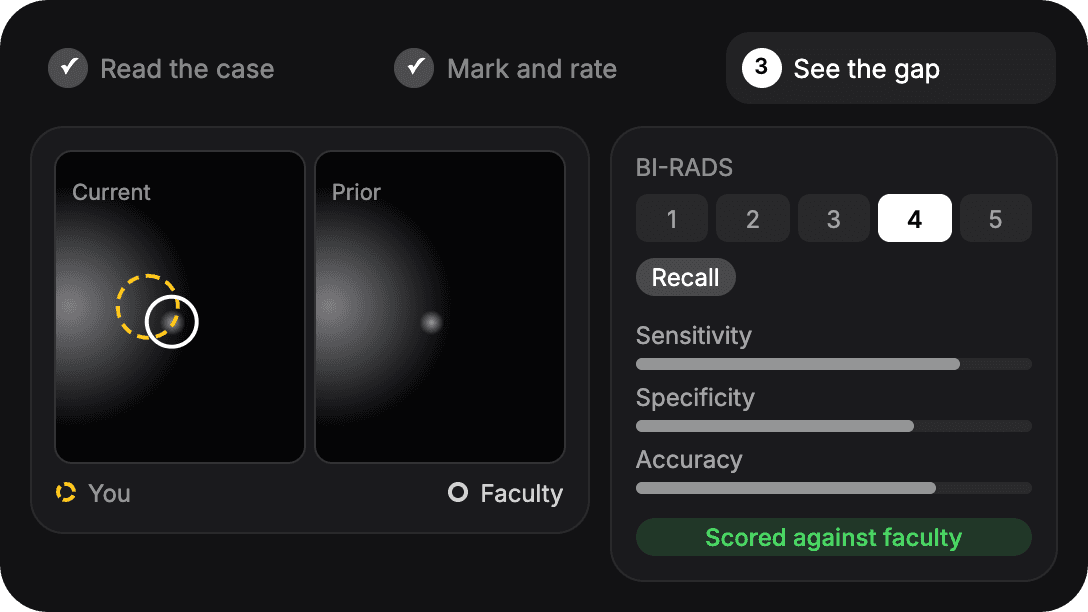
Case-reading tools let trainees annotate a study, choose a BI-RADS score and compare their read with faculty, case by case. Your courses get objective measures, such as sensitivity and specificity, that radiologists already use. See custom LMS development.
AI reporting tools draft structured radiology reports from your own templates inside your product. Reports read consistently across readers, and the radiologist keeps the final word. See generative AI development.
It gives reading time back to the people who read. In a February 2026 ACR Bulletin article, the Harvey L. Neiman Health Policy Institute reported radiologists leaving practice at over twice the rate of less than 10 years ago.
Most imaging builds break between steps: a header tag nobody read, a patient name left in a file, a layout radiologists reject. We design each hand-off in discovery, so a study goes from upload to score without manual fixes. Steps 1–5 are the path we built for a radiology education platform; backup is our standard design.
AI in imaging keeps growing, and it stays regulated. In Innolitics’ July 2026 review, the FDA authorized 86 AI/ML devices in Q2 2026, 59 of them in radiology. Techuz builds the software around models; your regulatory team owns any FDA pathway.
Build on OHIF and Orthanc when imaging lives inside your own product and you want your own layouts, forms and scoring. License a commercial platform when you need a cleared diagnostic workstation quickly and won’t maintain code.
Not sure which side you’re on?
Book a 30-minute call with a tech lead, or see how we approach healthcare web development.
An imaging platform that’s live with trainees, and a regulated product for medical device teams that we’ve built since its first commit.
A radiology education platform with real case reading. Four course types in one account, plus anonymized DICOM cases read in the browser and scored against faculty.
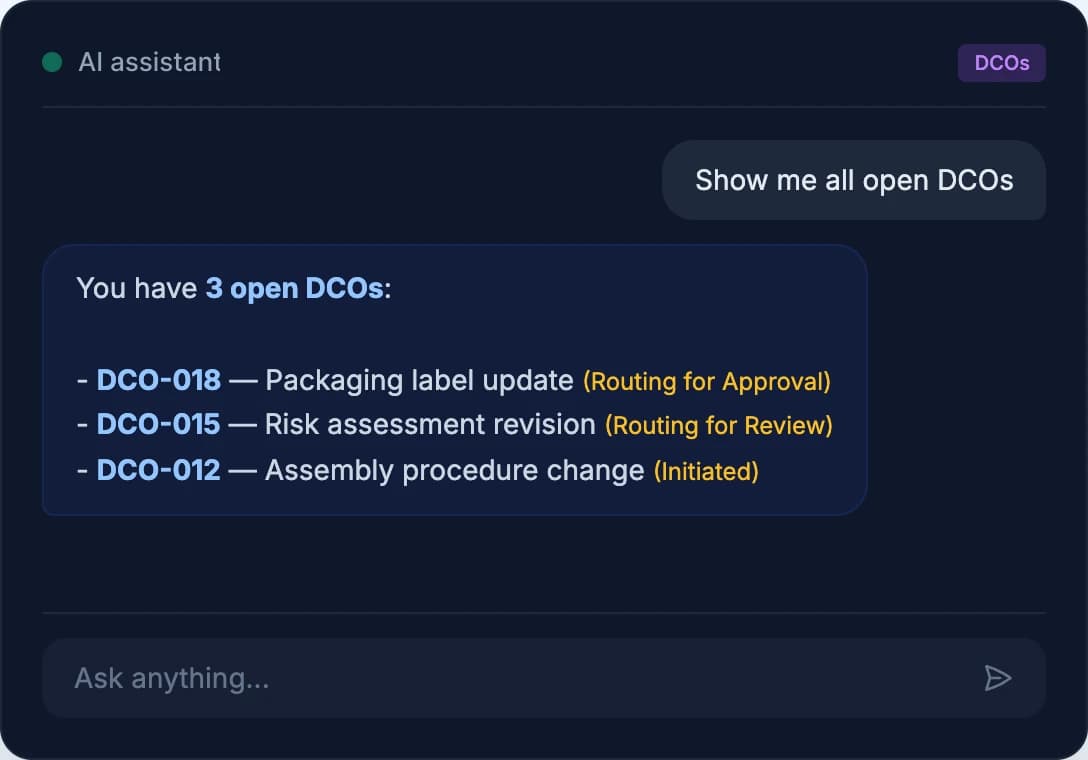

Quality management software for teams under FDA 21 CFR Part 11 and ISO 13485: controlled documents, change orders and training records in one place, with close to 4,000 commits in the first year. Each approval is re-authenticated, fingerprinted with SHA-256 and issued its own signature certificate.
Across the 8+ projects we built with Claude Code in the last year, delivery took up to 50% less time than comparable builds the year before. See how we work.
Medical imaging software from Techuz costs $10k–15k for a small build, $25k–50k for mid-size and $50k+ for large, built in phases. Rates are $20–25 an hour, depending on role and seniority.
$10k–15k
Small
8–12 weeks
A browser viewer or an upload-and-read module added to your existing platform
$25k–50k
Mid-size
12–24 weeks
Viewer, archive and scoring or reporting for two or three user roles
$50k+
Large
Built in phases · 6–12 months
A full learning or reading platform with archive, scoring and AI features
Small
8–12 weeks
A browser viewer or an upload-and-read module added to your existing platform
$10k–15k
Mid-size
12–24 weeks
Viewer, archive and scoring or reporting for two or three user roles
$25k–50k
Large
Built in phases · 6–12 months
A full learning or reading platform with archive, scoring and AI features
$50k+
Compliance work such as audit trails, e-signatures and data residency is scoped in discovery, not priced as a fixed add-on.
Every price includes QA, project management and 30 days of free support.
Cloud storage and hosting are listed with monthly costs in the proposal.
By keeping archives off the open internet and patient details out of studies. In Rapid7’s February 2026 research, more than 15 PACS devices in the UK were directly reachable from public IP space.
We build on open standards, DICOM and DICOMweb, so your images move with you if you change vendors. OHIF’s July 2026 release, v3.13, overhauled its rendering engine and added a FHIRcast mode. We keep forks close enough to take changes like these.
Zero-footprint reading in the browser, forked so you keep upstream fixes
An open-source PACS with web access and a cloud storage plugin
Health data under a business associate agreement
AI features called through your back end; open-source models where patient data must stay on your servers
If you need a cleared diagnostic workstation for primary reads, license an established product: Techuz holds no FDA clearance for imaging software. We also haven’t built 3D reconstruction, teleradiology or VNA systems. If you only need a stock viewer installed as is, plain OHIF may be enough without us.
Medical imaging software development is building the tools that store, show and work with scans such as X-ray, mammography and MRI. It covers DICOM viewers, image archives, upload and anonymization, and reading or reporting tools.
PACS stands for picture archiving and communication system. In radiology, it’s the archive that stores scans in the DICOM format and sends them to viewers and other systems. Techuz builds on Orthanc, an open-source PACS, and can run it on cloud storage such as Azure Blob.
A PACS stores and serves images; a DICOM viewer displays them for reading. Most products need both: the viewer requests a study from the archive over DICOMweb and shows it in the right layout. Techuz pairs an OHIF viewer with an Orthanc archive.
With Techuz, a small imaging build takes 8–12 weeks, a mid-size one 12–24 weeks and a large platform 6–12 months, built in phases.
No, Techuz has not obtained FDA clearance for any software it has built, and doesn’t claim it. If your product needs clearance, your regulatory team leads the pathway. Techuz builds to its documentation needs, with audit trails, version history and test records you can hand over.
Tell us what you're building. We reply within 24 hours and send a ballpark estimate within 48.

