
Posted on
September 30, 2026
Updated on
September 28, 2026
Read time
 11 mins read
Quick Answer: Adding AI to a working application almost never requires a rebuild. It requires a boundary: one AI service layer behind an API that your existing app calls, containing the prompting, retrieval, fallback, and logging, while the core product stays untouched. The sequence is six steps: pick one workflow by verification cost, design the boundary, build the fallback before the feature, plumb the minimum data safely, instrument cost, latency and quality from day one, and expand only on evidence.
The evidence for sequencing over enthusiasm is stark: S&P Global found 42% of companies abandoned most of their AI initiatives in 2025, up from 17% a year earlier, scrapping 46% of proofs-of-concept before production. The companies in the other 58% didn’t have better models. They had smaller first steps and better wiring.
The scene repeats in every second discovery call we take. A product leader has a working application, paying customers, and a board that wants to know the AI story. Three vendors have been consulted. All three proposals begin, politely, with a rebuild: a new platform, a data migration, a two-year roadmap. And the product leader is sitting with the correct instinct that something is off: we have a product people use. I want to add intelligence to it, not replace it.
That instinct is right, and there’s a fifty-year-old analogy for why. Andrew Ng famously put it this way:
“AI is the new electricity.”
Andrew Ng, Stanford Graduate School of Business (2017)
Take the analogy seriously and notice what nobody did when electricity arrived: they didn’t demolish the house. They wired it. Room by room, starting with the room where light paid for itself fastest, on wiring designed so a blown bulb didn’t burn the place down. That is exactly the shape of good AI integration, and this guide is the wiring diagram we use as an AI development company: six steps, one diagram, and the patterns table at the end.
Why “Add AI” Rarely Requires a Rebuild, and When It Does
A rebuild proposal assumes the intelligence must live in the core. It doesn’t. Modern AI capability arrives through an API call, which means the real architectural question is not “how do we rebuild around AI?” but “where does the call live?” Get that answer right (a dedicated service layer, described in step 2) and your existing application needs to learn exactly two things: how to call one new endpoint, and how to render one new kind of result. Everything else about the product stays as it was yesterday.
The honest exceptions, so you can check yourself against them: a rebuild conversation is legitimate when the data the AI needs is locked inside a system with no API surface at all and no way to add one; when the application is already scheduled for replacement on its own merits, and AI is simply joining that roadmap; or when compliance genuinely requires processing isolation the current architecture cannot express. Outside those three, “we need to rebuild first” usually translates to “we’d prefer to build,” and it is the beginning of the pattern where 46% of proofs-of-concept die before production: too much surface area, too long before anyone sees value.
The Six-Step Sequence
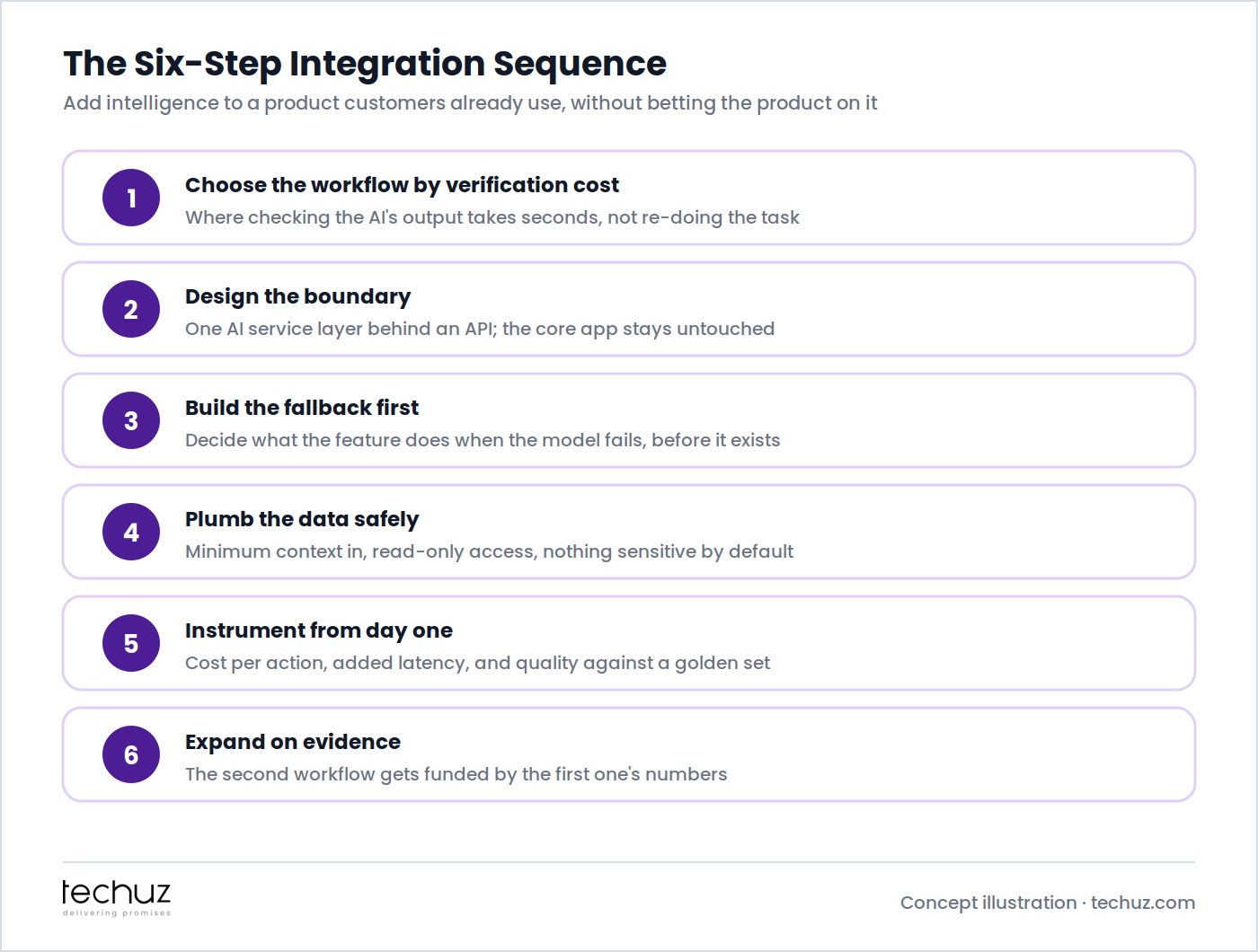
Step 1: Choose the Workflow by Verification Cost, Not by Excitement
The first AI feature should not be the most impressive one. It should be the one where checking the AI’s output costs far less than doing the task: drafting the support reply a human approves in ten seconds, pre-filling the categorization a reviewer confirms with one click, summarizing the document the reader would otherwise skim anyway. Where verification is cheap, wrong outputs cost seconds; where verification means redoing the work, the AI saves nothing even when it’s usually right. This is the map we drew in where generative AI actually improves efficiency, and it is the single best predictor of whether the feature survives contact with users.
Concretely: list your product’s ten most frequent user workflows, estimate for each “if the AI’s output were wrong, how long until someone notices, and what does noticing cost?”, and pick the workflow with high frequency and cheap verification. That’s the room you wire first.
Step 2: Design the Boundary: Where the AI Call Lives
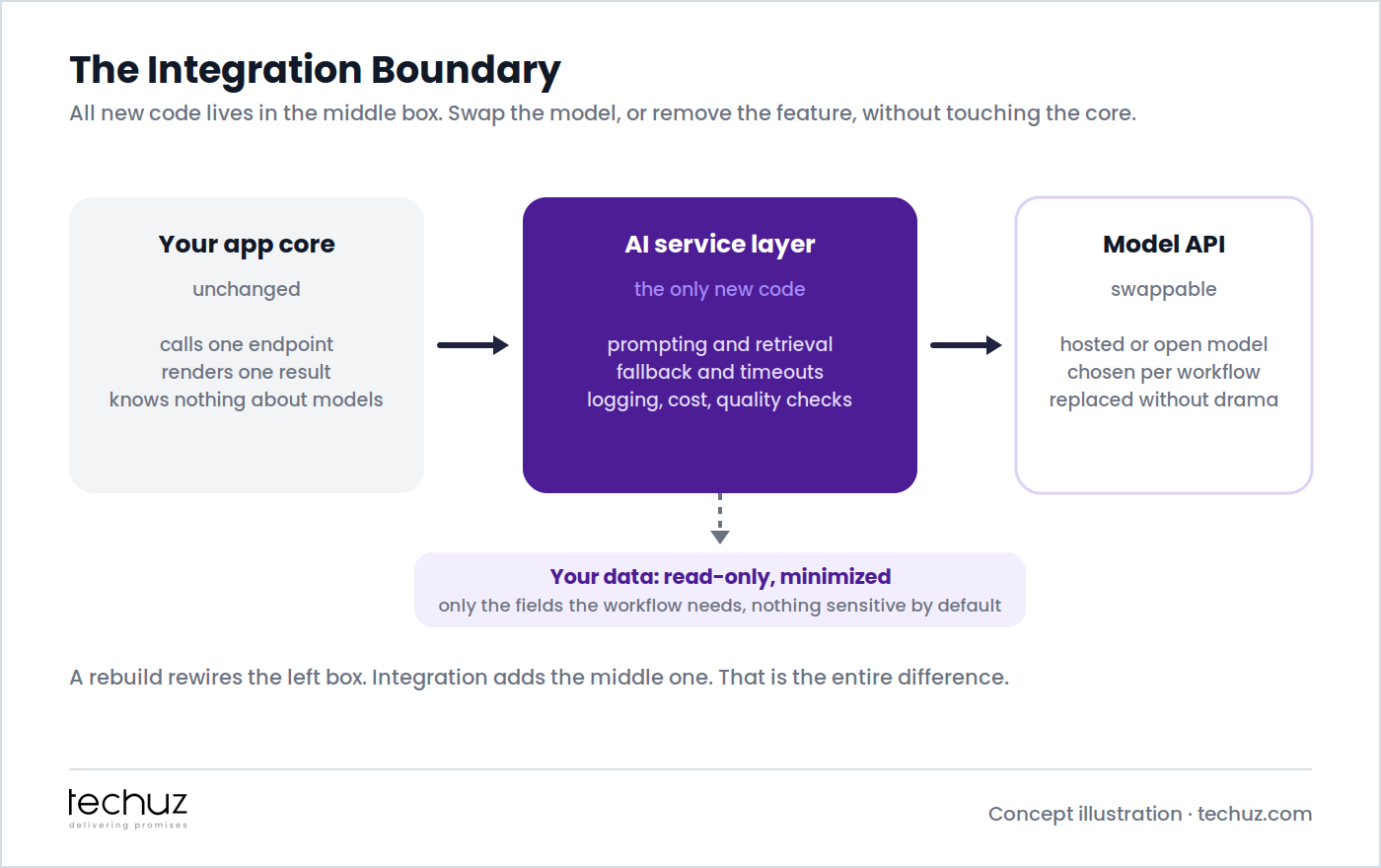
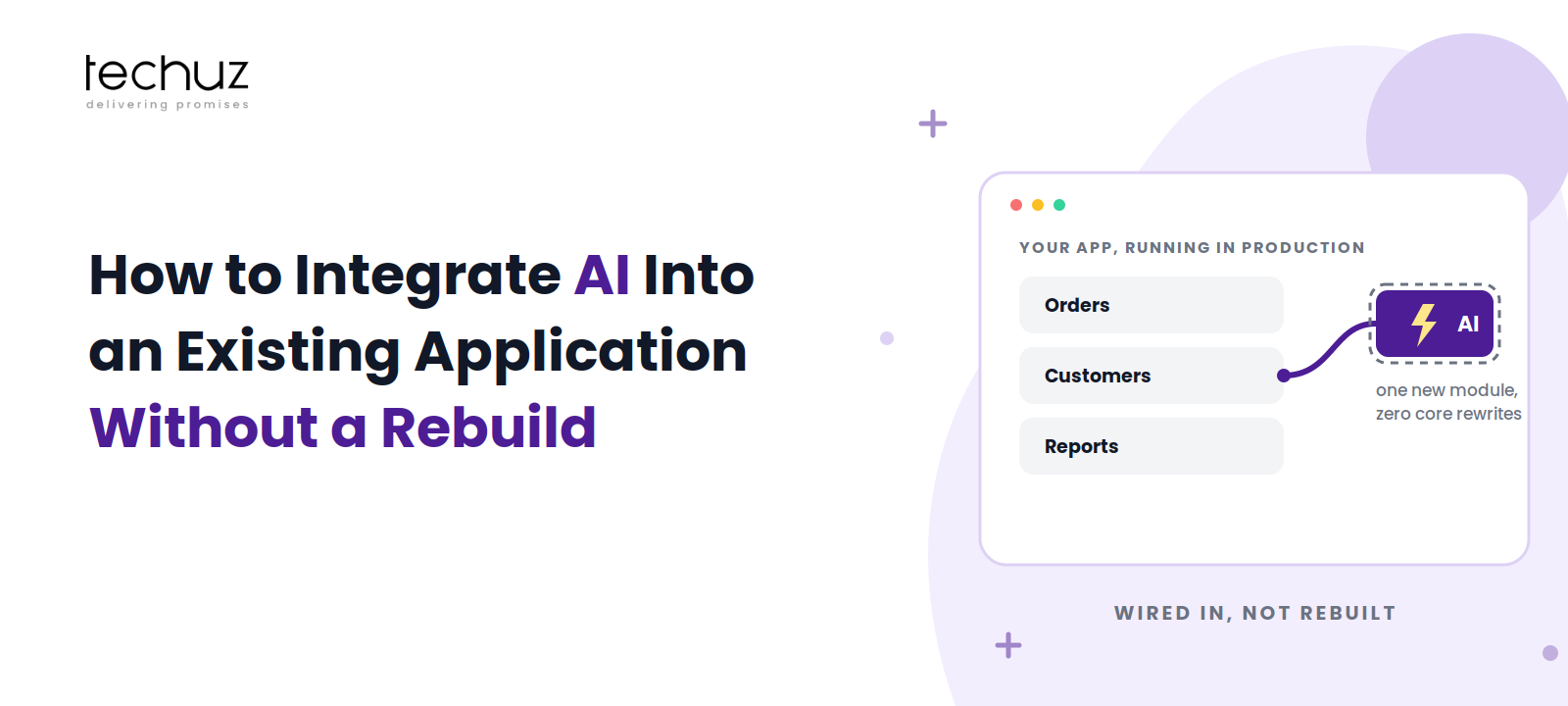
All new code lives in one place: an AI service layer that sits between your application and the model provider. Your core app calls one endpoint and renders one result; it knows nothing about prompts, models, or vendors. The service layer owns prompting and retrieval, timeouts and fallbacks, logging, cost tracking, and quality checks. The model API on the far side is deliberately swappable: chosen per workflow, replaced without drama when a better or cheaper one appears.
This boundary is what makes the whole endeavor low-risk. Ship it behind a feature flag and the blast radius of the entire AI initiative is one endpoint. If the feature disappoints, you remove a call site, not a platform. A rebuild rewires the left box; integration adds the middle one. That is the entire difference, and it’s why the same pattern (an anti-corruption layer, in older architectural language) is how careful teams renovate anything load-bearing, as we covered in load-bearing code.
Step 3: Build the Fallback First
Before the AI feature exists, decide what the product does when the model fails, times out, or returns something unusable, because all three will happen weekly. The fallback hierarchy, in order of preference: degrade to the pre-AI behavior (the form still submits, the search still searches, just without the assist), serve the last known-good result where staleness is acceptable, or route to a human where the stakes demand it. The one forbidden option is the one teams build by accident: block the user’s task on a failing model call.
Building the fallback first has a second benefit nobody expects: it forces the team to define what the AI is actually for. If you can’t describe the non-AI fallback, the feature was load-bearing magic, and the Air Canada tribunal showed where that ends: the airline was held liable for its chatbot’s invented policy. Your AI’s output is your product’s output. Design for the day it’s wrong before the first day it’s live.
Been quoted a rebuild for a bolt-on problem?
Techuz AI integration engagements start with your running product: one workflow, one boundary, a fallback, and live meters, typically in weeks. The rebuild conversation happens only if your architecture genuinely demands it, and we’ll show you the evidence either way.
Step 4: Data Plumbing: What the Model Needs, and How It Gets There Safely
The model needs context, and the discipline is minimization: the fields this workflow requires, read-only, and nothing sensitive by default. In practice that means the service layer queries your existing database or APIs (never a new “AI data lake” for workflow one), strips or masks PII that the task doesn’t need, and logs exactly what context was sent, so the answer to “what does the AI see?” is a query you can show an auditor rather than a shrug.
When the workflow needs your business knowledge (policies, docs, product data), retrieval beats fine-tuning for the same reasons we detailed in the grounded chatbot guide: facts change, and an index updates in minutes while a fine-tune goes stale silently. And the vendor-side hygiene is contractual, not just technical: API keys scoped per workflow, and a data-processing agreement that says your context isn’t training someone else’s model. This is where an experienced LLM development company earns its fee less with cleverness than with restraint.
Step 5: Instrument Cost, Latency, and Quality From Day One
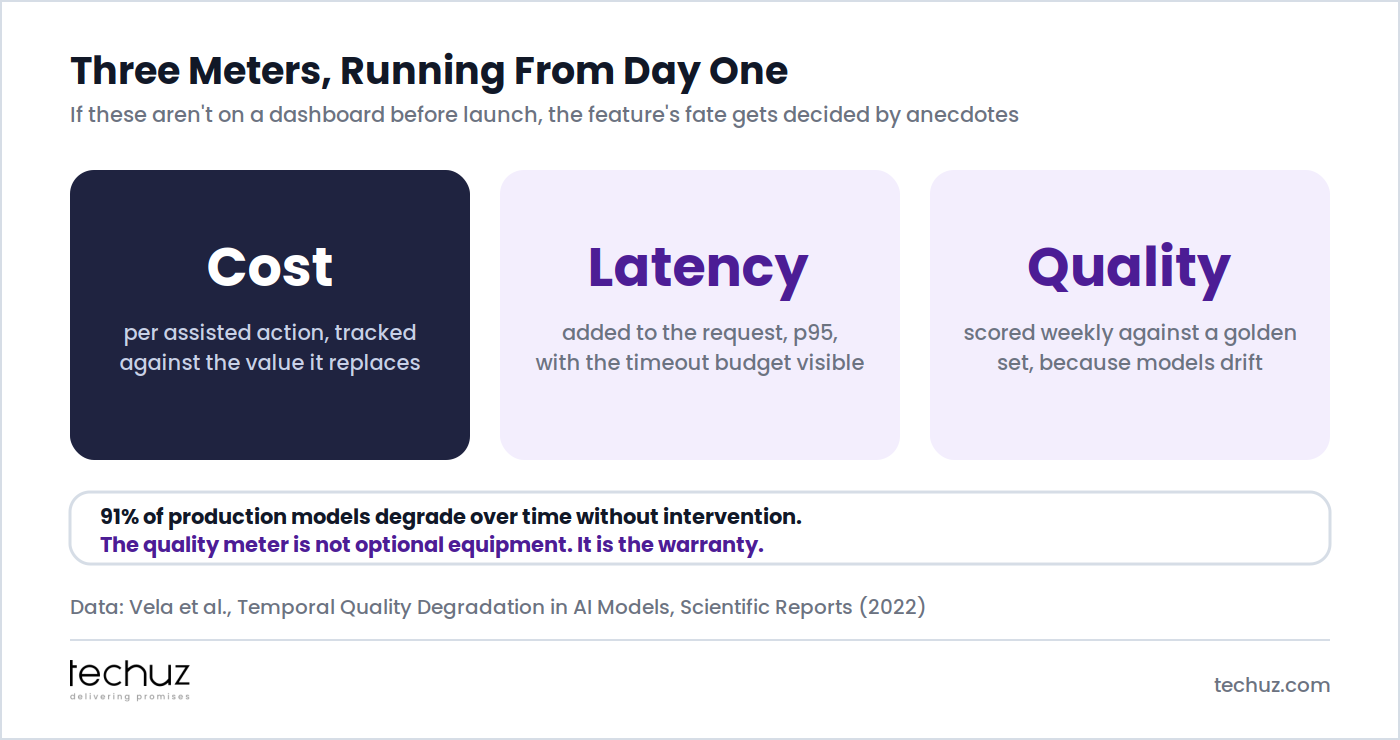
Three meters, on a dashboard, before the first customer touches the feature. Cost per assisted action, tracked against the value of the effort it replaces, because inference cost scales with usage in a way normal software doesn’t, and the finance conversation will come. Latency added to the request, at p95, with the timeout budget visible, because an assist that adds three seconds is a feature users learn to avoid. Quality against a golden set: a fixed batch of real inputs with known-good outputs, scored weekly, because 91% of production AI models degrade over time without intervention, a decay pattern we mapped in the half-life of an AI agent. Without the meters, the feature’s fate gets decided by anecdotes, and anecdotes always feature the one spectacular failure.
Step 6: Expand From One Workflow to the Next, on Evidence
The first workflow’s meters are the business case for the second. “The support-draft assist handles 60% of tickets at $0.04 per draft, saving 11 minutes each, quality steady for two months” is a sentence that funds workflow two without a slide deck. This is precisely the discipline that separates the 58% from the 42% in the S&P data, and it’s the antidote to the pattern we dissected in why PoCs don’t move the efficiency needle: pilots that were never designed to produce the number that justifies their own expansion.
Expansion also gets cheaper each time, because the boundary is already built. Workflow two reuses the service layer, the logging, the fallback patterns, and the meters; it adds a prompt, a retrieval source, and a golden set. That compounding is the quiet payoff of doing step 2 properly: the first feature costs the most, and every one after rides its rails. Before picking workflow one, it’s worth scoring yourself honestly on data access, verification cost, and expectation-setting; we’re building that as an interactive AI Readiness Scorer, six questions in, a gap list out.
The Integration Patterns Table
| Pattern | Best for | Main risk | Example |
|---|---|---|---|
| Inline assist (sync call in the request) | Drafts and suggestions a user reviews immediately | Latency lands on the user; needs a tight timeout and fallback | Suggested reply in a support inbox |
| Async enrichment (queued, results attached later) | Summaries, tagging, extraction on records | Staleness and retry storms if the queue is unmanaged | Every uploaded contract summarized and tagged |
| RAG service (retrieval over your content) | Questions answered from your docs and data, with citations | Garbage sources in, confident garbage out; needs an eval set | In-app help that cites your actual policies |
| Batch scoring (scheduled runs over datasets) | Prioritization, classification, anomaly flags at volume | Silent drift; nobody notices scores decaying (meter it) | Nightly lead scoring in a CRM |
| Copilot surface (chat over your app’s actions) | Power users composing multi-step work conversationally | Widest surface, highest stakes; ship this last, not first | “Create a report of Q3 refunds and email it to finance” |
Most products should start in the top two rows and earn their way down the table. The copilot is the feature the board imagines first and the one the evidence should fund last.
Wire the first room this quarter
As a generative AI development company, Techuz delivers the boundary, the fallback, and the meters as standard, so your first AI feature ships in weeks and your second one is funded by its numbers.
FAQs
Do we need to rebuild our application to add AI features?
Almost never. AI capability arrives through an API call, so the architectural work is adding one service layer between your app and the model provider, not rewriting the core. The legitimate exceptions: data locked in a system with no API surface, an application already scheduled for replacement, or compliance isolation your current architecture cannot express.
Which workflow should get AI first?
The one where verifying the AI’s output is cheapest relative to doing the task: drafts a human approves in seconds, categorizations confirmed with a click, summaries of things people would skim anyway. High frequency plus cheap verification beats impressive every time, because wrong outputs cost seconds instead of trust.
How long does it take to integrate AI into an existing application?
With the boundary approach, a first workflow typically ships in weeks: the service layer, one prompt or retrieval source, a fallback, a feature flag, and the three meters. The rebuild quotes measuring in years are usually pricing a platform, not the feature you asked for.
What should the AI feature do when the model fails or times out?
Degrade to the pre-AI behavior first, serve the last known-good result where staleness is acceptable, or route to a human where stakes demand it. The one unacceptable design is blocking the user’s task on a failing model call, which is what happens by default when the fallback is designed after launch instead of before.
How do we keep AI features from quietly getting worse over time?
Score them weekly against a golden set: a fixed batch of real inputs with verified good outputs. Research on production models found 91% degrade over time without intervention, so the quality meter is the warranty, not optional equipment. An AI development company that delivers the feature without the meter has delivered the decay along with it.
Sources
- S&P Global Market Intelligence via CIO Dive: 42% of companies abandoned most AI initiatives in 2025, up from 17% (survey of 1,000+ enterprises)
- CBC News, Air Canada Found Liable for Chatbot’s Bad Advice on Bereavement Fares (2024)
- Vela et al., Temporal Quality Degradation in AI Models, Scientific Reports (2022)
- Andrew Ng, Why AI Is the New Electricity, Stanford Graduate School of Business (2017)
Looking for timeline and cost estimates for your app?
Contact us

Ankush Mathur

Ankush Mathur leads technology at Techuz as CTO & Technical Project Manager, where he helps startups and enterprises architect and scale their software. He's spent his career moving from hands-on development to technology leadership, and enjoys writing about engineering practices, AI, and the decisions behind building solid products.