
Posted on
September 25, 2026
Updated on
September 28, 2026
Read time
 11 mins read
Quick Answer: Token bill shock is what happens when a feature priced like software (zero marginal cost) behaves like a utility (metered cost per use). Every AI query has a real inference price, so under a flat subscription your most engaged users become your least profitable accounts. The fix is a cost architecture: know your cost per query, pull the four levers (model routing, caching, context discipline, output caps), price the heavy tail, and revisit the build-versus-rent question at volume.
The bill grows even while the meter gets cheaper: a16z’s LLMflation analysis found inference cost for equivalent-performance models falling roughly 10x per year, a 1,000x drop for GPT-3-class quality in three years. Usage, context sizes, and model upgrades grow faster than prices fall, which is why the shock keeps arriving on schedule.
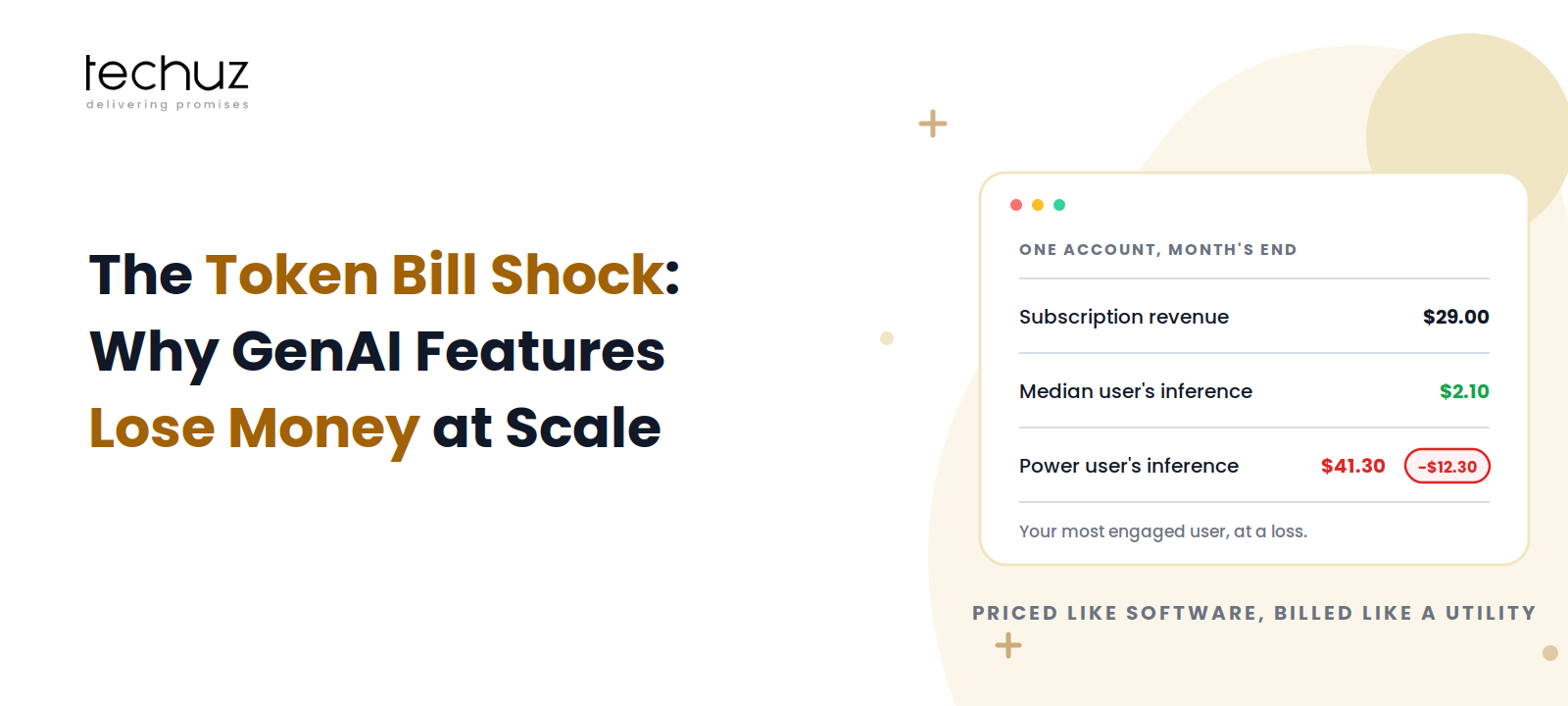
The trigger for this article is a sentence we hear in some version every quarter: “Our AI summary feature is the most-loved thing we’ve shipped, and our most engaged users are now our least profitable accounts.” Nothing went wrong, exactly. The feature works, users adore it, adoption is exactly what the roadmap hoped for. The problem is arithmetic that was signed off before anyone did it, and it starts with a category error.
Software Margins vs Utility Costs: The Category Error
Twenty years of SaaS trained everyone on one beautiful fact: the marginal cost of serving one more user rounds to zero. Hosting is real but tiny and amortized; the thousandth customer costs pennies; heavy usage is pure good news, because usage predicts retention and expansion. Every flat-price subscription model is built on that fact.
A GenAI feature quietly breaks it. Every query is metered work: tokens in, tokens out, each with a price, like electricity. The feature is software on the outside and a utility on the inside, and pricing a utility like software has a known failure mode: the customers who consume the most electricity pay the same flat bill as everyone else. What confuses the finance conversation is that the meter price itself is collapsing; per a16z’s data, equivalent-quality inference gets roughly 10x cheaper per year. Satya Nadella gave the economics its correct name when those falling prices met exploding usage:
“Jevons paradox strikes again.”
Satya Nadella, on AI efficiency and consumption (2025)
Jevons observed in 1865 that making coal engines more efficient increased total coal consumption, because cheaper use invites more use. The same holds here: cheaper tokens mean more features, bigger contexts, more calls per user, and upgrades to better models the moment they’re affordable. Falling prices are real, and so is your growing bill. The only way through is to treat cost per query as a designed number, the way a generative AI development company treats latency or uptime: an engineered property, not a weather condition.
The Cost-per-Query Worksheet
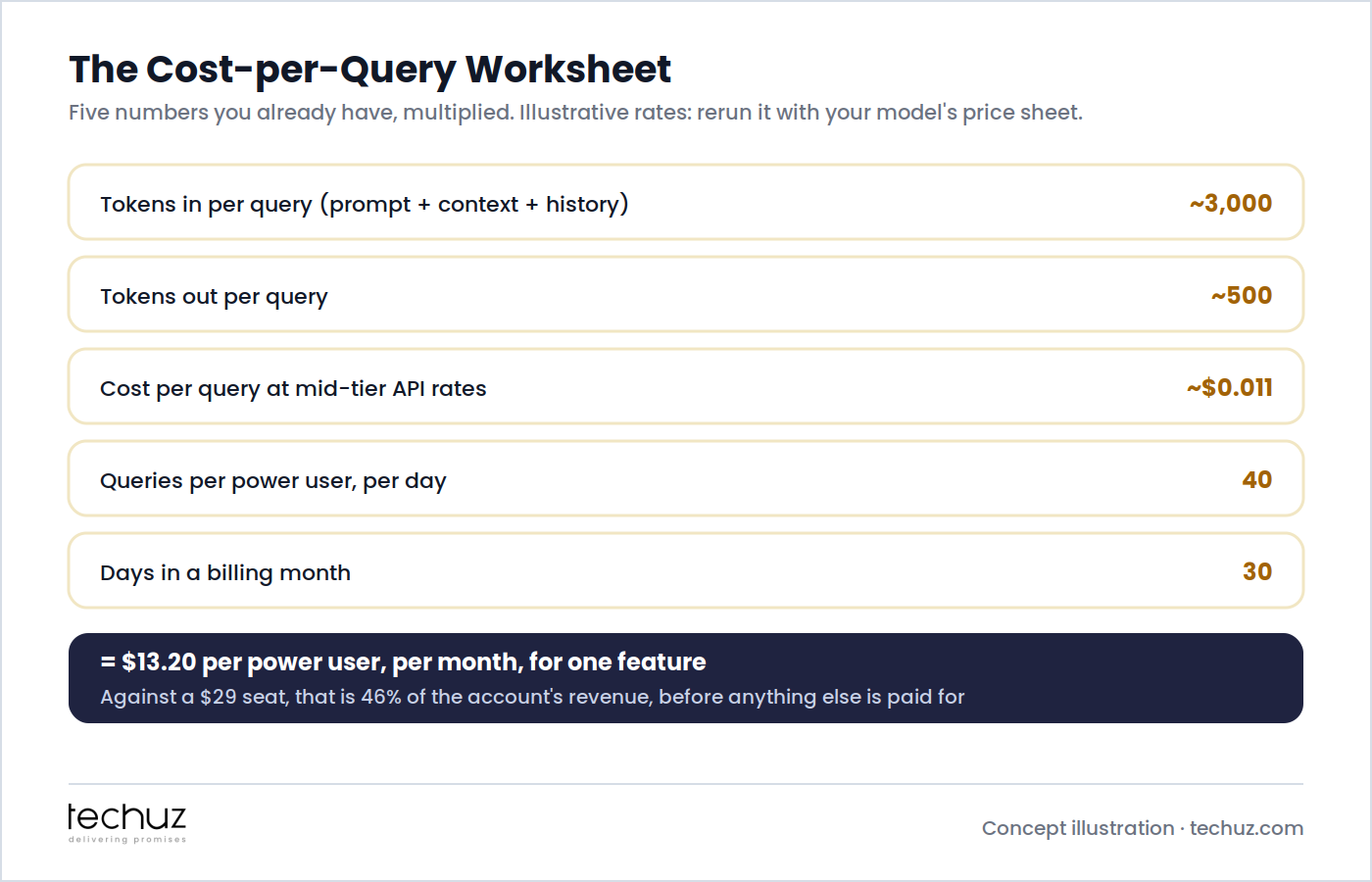
Five numbers you already have, multiplied. Tokens in: your system prompt, plus the retrieved context, plus conversation history; a typical document-grounded feature sends ~3,000 tokens per query, and this number is nearly always bigger than teams think, because the system prompt and history ride along on every single call. Tokens out: ~500 for a summary-style answer, and output tokens are typically priced several times higher than input. At illustrative mid-tier API rates that lands around $0.011 per query. Harmless. Then the multiplication: a power user running 40 queries a day for 30 days is $13.20 a month, for one feature, against a $29 seat: 46% of the account’s revenue before you’ve paid for anything else. Run this worksheet with your own price sheet and your own P95 user, not your median one, because the P95 user is where the money goes. If you’ve shipped the cost instrumentation we specified in the LLM feature guide, these numbers are already on a dashboard; if they aren’t, this worksheet is the reason to add them this sprint.
Inverted Unit Economics: When Your Best Users Become Your Worst Accounts
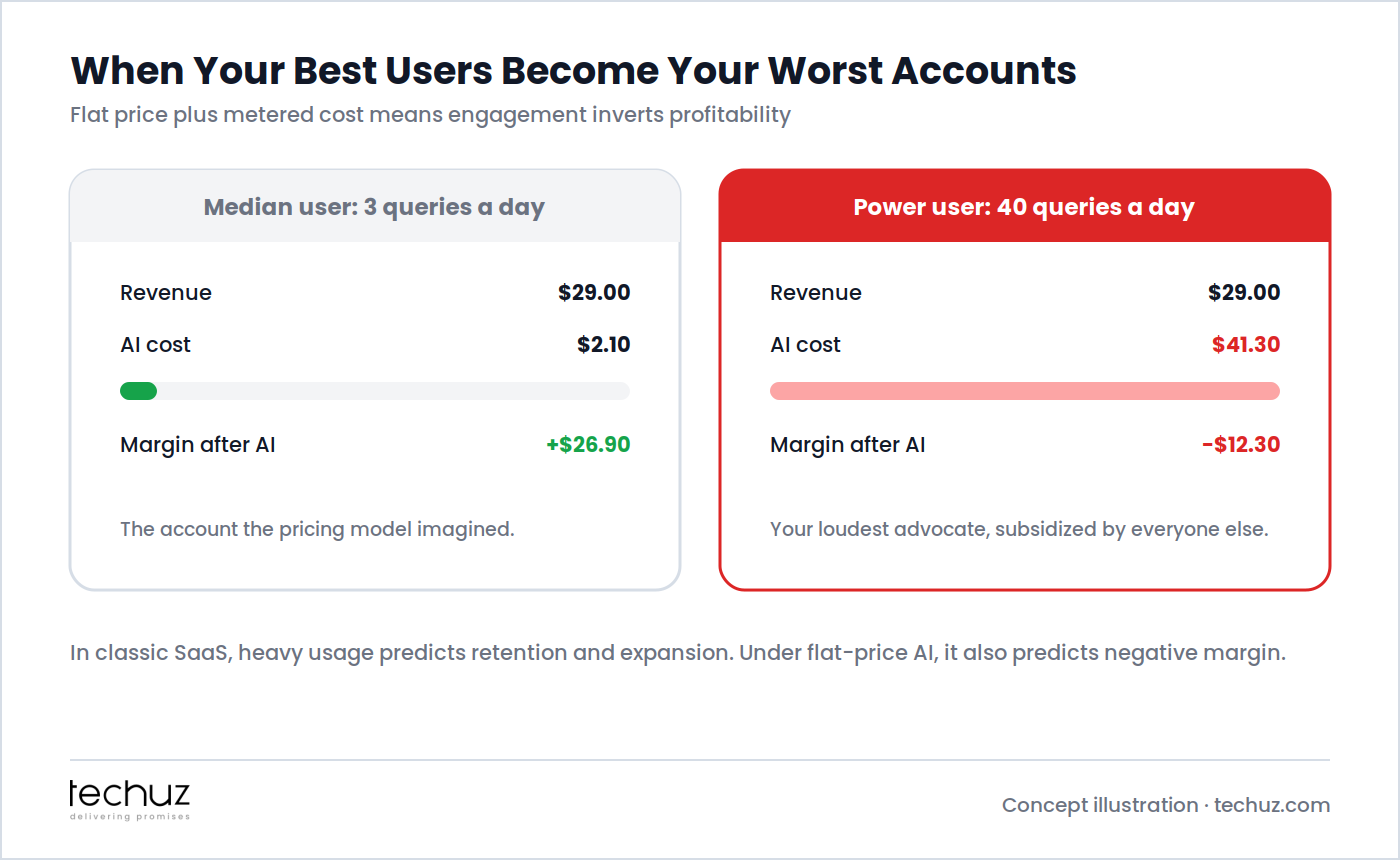
Put the worksheet’s two personas side by side and the inversion is visible: the median user at 3 queries a day costs $2.10 and leaves a healthy margin; the power user at 40 costs $41.30 against the same $29, and every additional query digs the hole deeper. This is the diagnostic to run before any redesign: plot inference cost per account against revenue per account. In classic SaaS that chart is boring. In flat-price AI it has a crossing point, and everyone to the right of it is being subsidized by everyone to the left, with your loudest advocates clustered furthest right. The strategic sting is that the usage you’d normally celebrate (and that genuinely does predict retention) is the same usage bleeding the margin, so the answer is never “discourage usage”; it’s the two toolkits below: engineer the cost down, then price the heavy tail honestly.
The Four Cost Levers
| Lever | What it does | Typical saving | Effort |
|---|---|---|---|
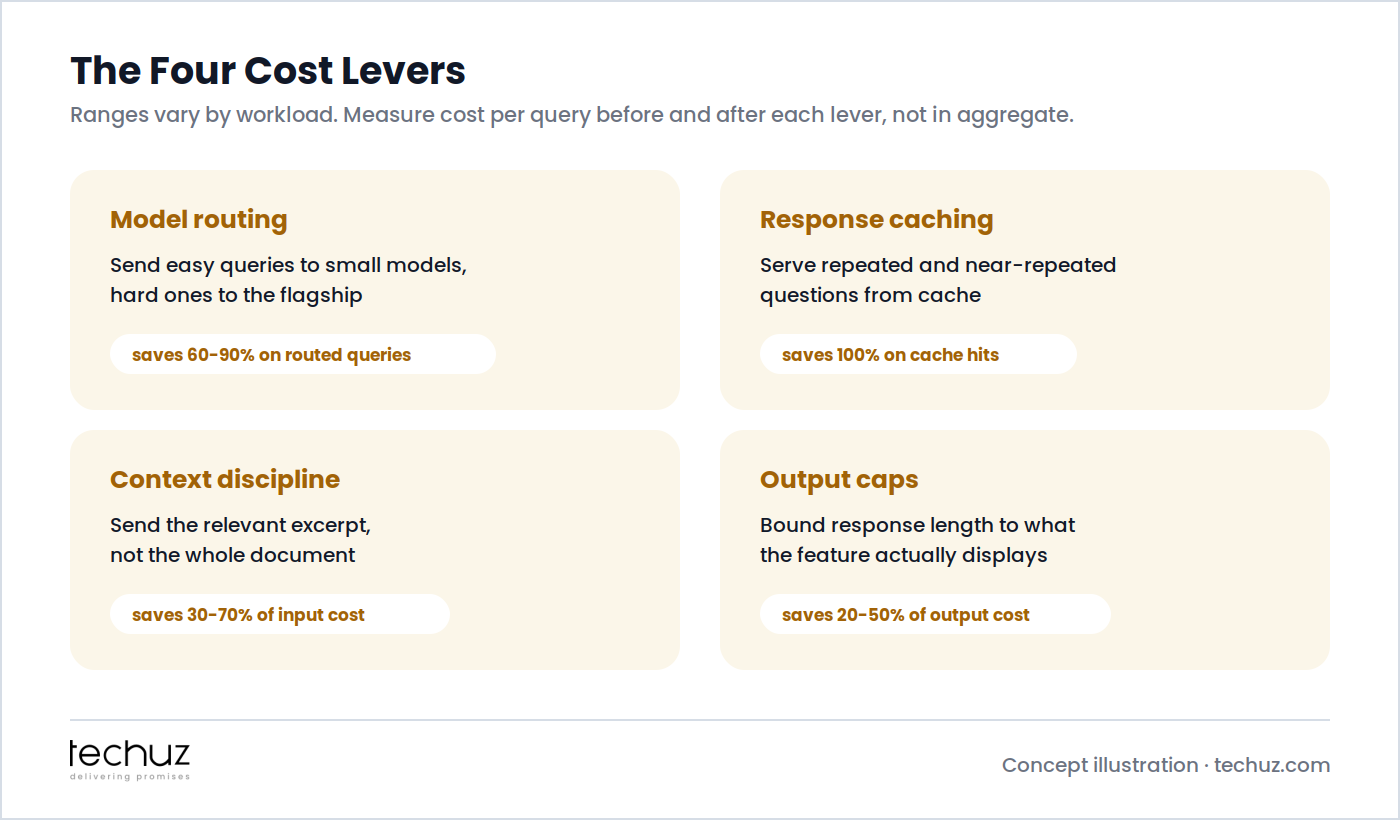
| Model routing | A classifier sends easy queries to a small, cheap model and reserves the flagship for hard ones | 60-90% on routed queries | Medium: needs an eval set to prove quality holds |
| Response caching | Serves repeated and near-repeated questions from cache instead of the model | 100% on cache hits | Low for exact-match; medium for semantic caching |
| Context discipline | Sends the relevant excerpt, trimmed history, and a lean system prompt instead of everything | 30-70% of input cost | Medium: retrieval tuning, and quality-test the trims |
| Output caps | Bounds response length to what the feature actually displays | 20-50% of output cost | Low: often a one-line change plus prompt guidance |
Three honest caveats. The ranges vary by workload, so measure your own cost per query before and after each lever rather than trusting anyone’s table, including this one. The levers compound but not multiplicatively; routing and caching overlap on exactly the easy, repetitive queries. And every lever is a quality trade until proven otherwise: a routed query answered badly or a context trimmed past usefulness costs more in churn than it saves in tokens, which is why each lever ships behind the same evaluation set that gates your quality. Notably, the industry data says this engineering is working: LangChain’s survey of 1,340 practitioners found cost fading as a top barrier to production while quality holds the #1 spot. Cost yields to architecture; that’s the good news inside the bill shock.
Is your AI feature margin-positive? Do you know?
Techuz builds GenAI features with the cost architecture included: per-query cost instrumentation, routing and caching layers, and an eval set that proves the savings didn’t cost you quality.
Pricing Responses: Tiers, Credits, and the AI Add-On
Engineering shrinks the cost curve; pricing has to handle the tail that remains, and there are three honest shapes. Usage tiers fold a generous allowance into each plan (“500 AI actions a month on Pro”), which preserves flat-price simplicity while capping the subsidy; most users never touch the ceiling, and the power users who do are precisely the ones who value the feature enough to upgrade. Credits price the metered thing in metered units, which matches cost to revenue perfectly and suits bursty, high-variance workloads; the trade is cognitive, since users who count credits use the feature less, so credits fit best where each action has visible standalone value. The AI add-on SKU moves the feature into its own priced line (“+$15 a month for AI”), which keeps the base product’s economics untouched, makes the AI margin auditable on its own, and, not incidentally, forces the feature to prove it’s worth paying for. The wrong answer is the silent one: leaving the flat price alone and hoping the levers cover the tail, because engagement growth is the one thing you’re also trying to maximize. Pick the shape before the crossing point on the diagnostic chart, not after the board notices it.
The Small-Model Crossover: When Owning Beats Renting
There is a volume at which the build-versus-rent answer flips. Renting a frontier model via API is unambiguously right early: zero infrastructure, instant quality, and the 10x-per-year price decline works in your favor with every invoice. But if your feature does one narrow task at high volume (summarize this document type, classify this ticket, extract these fields), a small model fine-tuned on your accumulated production data can match the flagship on that task at a fraction of the per-token price, hosted or self-hosted. The crossover test has three parts, and all three must hold: the task is narrow and stable rather than open-ended; monthly API spend on it has grown past the point where it dwarfs the one-time fine-tuning and the ongoing serving-plus-MLOps burden; and you have real production traffic to train and evaluate on, which, conveniently, your rented-API phase has been collecting all along. That’s the right sequence: rent to learn, and let the API receipts and logged traffic tell you when owning wins. It’s a genuine engineering project with real ongoing costs (serving, monitoring, retraining as inputs drift), which is exactly the follow-the-drift discipline from our model half-life work, so treat the crossover as an LLM development decision with a spreadsheet attached, not a sovereignty instinct.
Cost per Query as a First-Class Product Metric
Everything above collapses into one operating habit: put three numbers on the same dashboard as activation and retention, reviewed at the same cadence. Cost per query (by feature and by model), which catches regressions the day a prompt change doubles the context. Inference cost per account per month against that account’s revenue, which is the inversion chart from earlier, watched continuously instead of discovered annually. Gross margin per AI feature, which turns “should we keep this?” from a sentiment debate into a line item. This is the same discipline we argued for in the Efficiency Map: AI features justified by measured economics rather than by demo applause, and it’s what separates teams for whom the token bill is a shock from teams for whom it’s a Tuesday. An AI development company that ships you a feature without shipping you these three meters has given you a liability with a nice interface.
Ship AI features that make money at scale
From cost-per-query instrumentation to routing, caching, pricing-model design, and the small-model crossover analysis: Techuz engineers the economics alongside the feature, so growth improves your margin instead of eating it.
FAQs
Why do AI features lose money on flat subscription pricing?
Because the pricing assumes software economics (near-zero marginal cost) while the feature has utility economics (a real, metered cost per use). Under a flat price, cost scales with engagement but revenue doesn’t, so the most engaged users consume more inference than their subscription covers, and the accounts you’d normally celebrate become the ones with negative margin.
How do I calculate the cost per query of an LLM feature?
Multiply tokens in (system prompt + retrieved context + history) by the input price, add tokens out times the output price, then multiply by queries per user per day and days per month. Run it for your P95 user, not your median: a feature averaging $0.011 per query becomes $13.20 a month at 40 queries a day, which is 46% of a $29 seat for one feature.
What is the fastest way to reduce LLM inference costs?
Output caps and exact-match caching, because both are low-effort: bounding response length to what the UI displays typically cuts 20-50% of output cost, and caching repeated questions eliminates their cost entirely. The larger savings, model routing (60-90% on routed queries) and context trimming (30-70% of input), take more work because each needs an evaluation set proving quality held.
Should I fine-tune my own model instead of using an API?
Only after three conditions hold: the task is narrow and stable, your monthly API spend on it dwarfs the fine-tuning plus serving and MLOps burden, and you have production traffic to train and evaluate on. Until then, renting a frontier model is right, and the falling per-token prices work in your favor. Rent to learn, and let the receipts tell you when owning wins.
How should SaaS companies price AI features?
Match the pricing shape to the cost shape: usage tiers (an included allowance per plan) preserve simplicity while capping the subsidy to heavy users, credits fit bursty workloads where each action has visible standalone value, and a separate AI add-on SKU keeps the base product’s margin untouched and makes the AI’s economics auditable. The only wrong answer is a silent flat price with no allowance, because that turns your engagement growth into margin decay.
Sources
- Guido Appenzeller, Andreessen Horowitz, Welcome to LLMflation: LLM inference cost is going down fast (10x per year for equivalent performance)
- LangChain, State of Agent Engineering (survey of 1,340 practitioners)
- Satya Nadella, public remarks on the Jevons paradox and AI consumption (2025)
- William Stanley Jevons, The Coal Question (1865), origin of the Jevons paradox
Looking for timeline and cost estimates for your app?
Contact us

Hemagini Jain

Hemangini Jain is a Co-Founder at Techuz, where she helps startups turn ideas into market-ready SaaS products often in 16 weeks or less. She's worked with founders behind $10M+ success stories and enjoys writing about MVP development, AI, product strategy, and what it really takes to launch.